Questions?
SciShield Setup
What is SciShield?
At the UVM, SciShield is the centralized online platform used for managing laboratory safety, compliance, and operations. It was adopted in February 2023 to replace older systems and streamline lab oversight. Here's a breakdown of its key features and functions:
- Lab registration and set up
- Personnel and emergency information
- Chemical inventory via ChemTracker
- Self inspections and internal audits
- Online training and training records
- Equipment tracking (optional)
Keeping SciShield up to date is essential for maintaining safety, compliance, and effective communication.
SciShield uses some specific vocabulary that is defined below:
| Term | Definition |
| Laboratory | Refers to a group working under a Principal Investigator (PI). SciShield uses the last name of the PI to indicate the name of a lab group. |
| Space | Refers to the rooms and areas used by the lab group. For example, tissue culture room, or bench 1. |
| Laboratory Members | Anyone who does any work in any of a lab’s spaces under the PI. This includes faculty, staff, visiting researchers, and students. |
| Door Sign | SciShield generates both a digital and physical door signs for each lab space which are required to be displayed. |
| Unique Container ID | This is an auto-generated ID number given to each chemical container. |
If you need help with set up, or have any questions, you can download our Guide to SciShield or contact safety@uvm.edu. You can also visit our SciShield FAQ page for frequently asked questions.
Setting Up SciShield
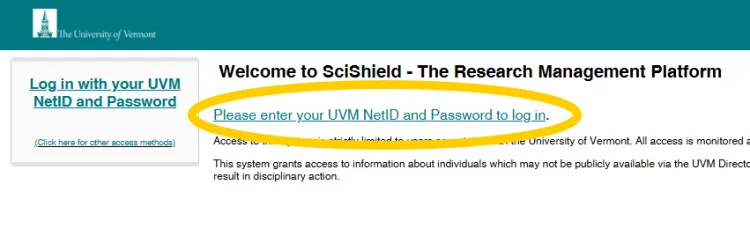
The first step in setting up your Scishield page is contacting safety@uvm.edu to create a lab group. Once this has been done, go to https://uvm.scishield.com and log in with your UVM NetID. SciShield can be accessed from any device (including your phone or tablet).
You can find more information on our Register Your Laboratory page.
We recommend taking the time to fill out even optional information (such as research focus and equipment) as this can be useful to EHS staff and emergency responders.
Door Signs
All spaces under your purview should be listed in SciShield. Each space in your lab group requires a SciShield door sign. You can include the information for up to three individuals as emergency contacts. These should be workers that have had all the mandatory trainings AND know the hazards and protocols of the lab.
- In shared spaces include the PIs in these main contact slots. If more PIs exist than three put remaining contacts and numbers in the notes section of the sign.
- If the lab has only one Lab Supervisor/PI, also include the information for the Lab Safety Officer.
- Labs must have at least two contacts on their signs.
- Since emergencies often happen out of hours, use a cell number rather than an office number.
Lab hazards on your door sign will automatically generate based on the information you provided in the set-up wizard. Specific space hazards can be added or altered after populating the lab hazards. You can then add required PPE and other instructions e.g. required training to finish creating your door sign.
Lab Members and Online Training
Who will be working in your lab?
This includes:
- Undergraduates working part time in the lab
- A graduate student on rotation
- Summer students and interns
The list should not include individuals who only occasionally use equipment or reagents in your lab space, who work under another PI. Don’t forget to remove lab members when the graduate or move on!
Remember to include all relevant job activities for each lab member, as this will trigger training requirements. Training requirements vary between labs depending on what job activities are being performed. You can find out which training is required for your lab group and members on our Lab Safety Training page.
Online training is not a substitution for the hands-on training that lab users receive but is important to ensure safety and compliance when working in the laboratory. Trainings completed on SciShield, in addition to EHS provided classroom trainings, are recorded on SciShield. Training should automatically be assigned to those required to take it based on lab member's job activities.
Equipment
Whilst it is not a requirement to list equipment on SciShield, you may find it beneficial in order to track inventory, certifications, or even user manuals.
Listing equipment on SciShield also makes it easier for the EHS team to access should they need.
Please contact Physical Plant before installing large pieces of equipment, or for electrical or plumbing requests. Principal Investigators are considered "stewards" of their labs. Please do not re-wire or drill holes into any UVM facility without first notifying Physical Plant personnel.
Chemical Inventory
ChemTracker is a web-based software program within Scishield that tracks chemical containers and links them to important safety and regulatory information. UVM utilizes ChemTracker to make real-time chemical inventories available to laboratory members, safety staff, and emergency responders. You can use ChemTracker to keep track of your chemicals, borrow chemicals from other lab groups, and lookup important safety information on SDSs. ChemTracker also helps reduce overstocking and overbuying of chemicals across campus.
Chemical inventory should be updated every six months and when new chemicals come into the lab. All chemicals, not just hazardous ones, need to be logged on ChemTracker. Use the Reconciliation tool in ChemTracker to update your SciShield inventory so that it matches the physical inventory in your lab.
There are several ways to add new inventory to your ChemTracker; Individually searching the chemical by name, CAS number, or product name / number, bulk importing chemicals using the excel template, or by using your camera to take a photo of the chemical container and uploading via ChemSnap AI.
You may choose to share your chemical inventory with other lab groups within your building via Find Other Chemicals. Visibility of your inventory to others is determined by the container status (hidden, normal or surplus) assigned to each individual chemical container.
General Setup Tasks
Lab Safety Notebook
Every lab at UVM is currently required to have a lab safety notebook for training records and procedural information – though much of the contents can now be found on Scishield or stored electronically so this process is in review. Our Lab Safety Notebook webpage details what information is required in the lab safety notebook.
An important part of setting up your lab is creating your notebook, deciding on a location for your notebook, and signposting it appropriately so it can easily be located.
Lab Safety Officers
A Principal Investigator may designate a Laboratory Safety Officer (LSO) to help improve safety culture and regulatory compliance in the lab. The LSO acts as a safety role model for other lab personnel, and will serve as the liaison between the lab and EHS.
An LSO may be asked by their PI to:
- Orient new lab personnel and ensure all lab members complete the required training
- Update the lab safety notebook
- Conduct or delegate another lab member to complete the monthly self-inspection on SciShield
- Review SOPs with lab personnel and provide education as procedures change
- Report employee or student injuries, exposures, and near-misses
- Ensure engineering controls and work practices are being followed
- Prepare lab for emergency responses (spills, evacuation, etc.)
- Request exposure monitoring when needed
You can find out more information, if required, on our Lab Safety Officer webpage.
New Employees
New employees in your lab should complete the OrientationTraining Checklist for New Laboratory Employees. New PIs can use the New Lab Setup Checklist to assist in lab setup.
Specific Safety Checklists
Biological Safety
- If required, register your lab with the appropriate committee (IBC, IACUC and CSC)
- Create SOPs and ensure they are easily accessible to all lab personnel
- Acquire biowaste boxes, bags, and tape for biowaste. You can find more information on our biowaste management webpage.
You can find out more about safe use of biological agents on our Biological Safety webpage.
Chemical Safety
- Complete appropriate Chemical Use Planning Forms and store in lab safety notebook.
- Input chemical inventory onto ChemTracker.
- Segregate chemical storage according to hazard.
- Establish appropriate hazardous waste storage area.
- Create SOPs and ensure they are easily accessible to all lab personnel.
You can find out more information on safe chemical use on our Chemical Safety webpage.
Radiation Safety
- Contact the Radiation Safety Office to discuss radiation requirements.
- Complete an Application for New Investigators to Procure, Purchase, and Use Radiation.
- Prepare for the Certification Exam.
You can find out more information on radiation use on our Radiation Safety webpage.
Emergency Preparation
Emergency Equipment
- Before work begins in your lab space, ensure that emergency eyewash and safety shower (if applicable) are located and flushed.
- Locate fire extinguishers and confirm that they are suitable for the hazards present.
- Contact EHS to acquire a chemical spill kit, and assemble a biological spill kit if required.
- Assemble first aid kit appropriate for hazards present.
- Ensure correct PPE is present - including additional PPE for emergencies. You can find more information on our PPE webpage.
Laboratory Emergency Response
Emergencies are situations where there is a threat of a fire, life-threatening situation, trauma, or sudden onset of illness. Be prepared for an emergency by reviewing institutional safety policies and procedures regularly.
Have a plan BEFORE the emergency!
There are seven steps of laboratory emergency response;
- Recognize and understand the hazards of the materials you are working with in your laboratory.
- Conduct a required monthly Laboratory Self-Inspection, as required by UVM's Lab Safety Program.
- Learn how to recognize an emergency - Sign up for UVM Lab Safety Trainings. Pay attention to what co-workers and lab community members are doing. Be alert for what might be an unusual situation.
- Take necessary steps to protect yourself first so that you are able to do what it might take to protect others.
- Assess the situation, once the event is under control, decide what it will take to do the proper cleanup.
- If you do not have all necessary materials or knowledge for cleanup, call UVM Service Operations at 656-2560. Leave your name and number and ask them to page EHS staff.
- Review how the incident was handled with your staff. Document and train everyone about your revised plan to prevent a similar event from happening again.
For more information, visit our Lab Emergency Response page.
Lab and Building Specific Safety Features
Review lab- and building- specific safety features, for example gas shut-offs and evacuation routes. You can find more information on our Building-Specific Safety Features page and our Fire and Life Safety page.
In the case of an evacuation, assembly points are determined by the PI. Ensure that this information is clearly communicated to all lab members and visitors to your lab space.