
Getting to know the Rubenstein School and UVM
As you prepare for your journey at UVM and in the Rubenstein School, we encourage you to get to know us. Learn more about the land we are on, our history, values, mission, and goals.
UVM Common Ground Values Rubenstein School History, Mission, Vision UVM Land Acknowledgement Inclusive Excellence in the Rubenstein SchoolPlease review the steps and materials below before your first group advising meeting. If you have any questions email RSENRStudentServices@uvm.edu.
Prepare for your Advising Meeting
Step 1: Understanding your degree requirements
There are four components of your degree:
- The Catamount Core Curriculum is a set of courses designed to broaden your knowledge, build key skills, and prepare you for lifelong learning and community involvement.
- It requires 42 total credits: 21 in Liberal Arts, 9 in Core Skills, and 12 in Common Ground Values. Many of these credits will be covered by the Rubenstein School Core Curriculum and your major — you can talk more about this with your advisor.

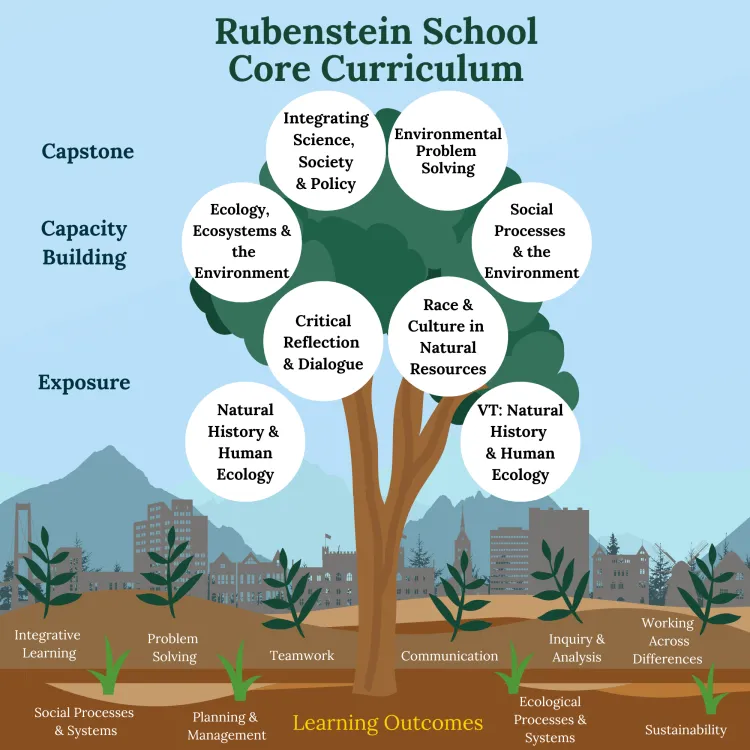
- The Rubenstein School Core Curriculum builds skills and knowledge that are central to the study of natural resources and the environment. It consists of eight required courses (25 credits) taken in sequence by all Rubenstein School students. The courses blend natural and social sciences to tackle complex environmental issues. In your first semester, you'll take NR 1010: Natural History & Human Ecology and NR 1050: Critical Reflection & Dialogue.
- The program requirements for your major. Explore our undergraduate major to learn more about course requirements for each.
- The program requirements for your minor (optional). Rubenstein School students can pursue minors across UVM, but minors are not required for our major programs. Explore minor and undergraduate certificate options.
Step 2: View your schedule
We've already registered you for classes!
- Before your group advising meeting, take a look at your pre-registered schedule. It includes required courses for your major and other classes suited for first-year students. You'll be able to add or change courses during the meeting.
- How to view your schedule:
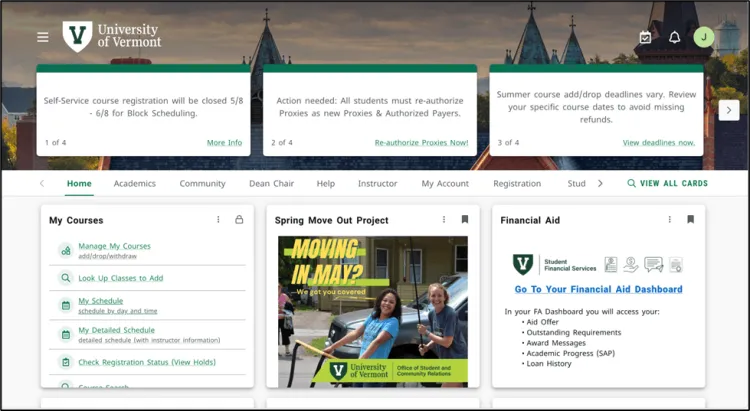
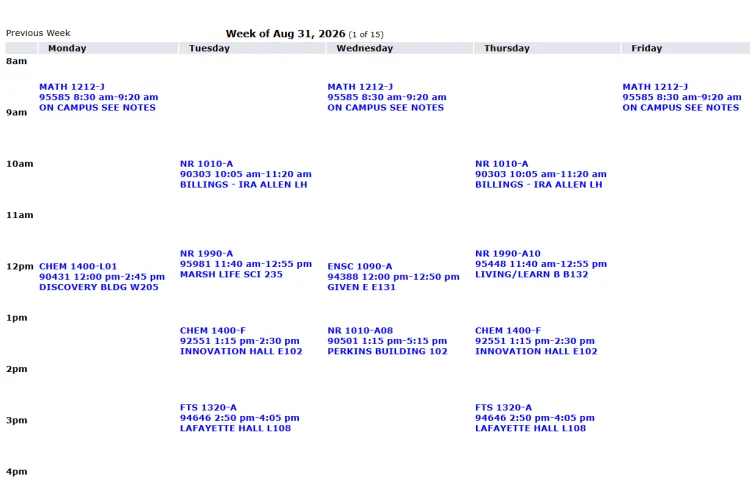
- Log into MyUVM. On the home tab, look for the ‘My Courses’ section. Click on “My Schedule” to see your weekly schedule. You can click on each course entry to see the full title.
- The schedule view will show classes by day and time. If you are not seeing anything on your schedule, try adjusting the date range using the "Previous Week" and “Next Week” options.
- If you need to add or swap any classes in your pre-registered schedule, start by identifying some courses you're interested in. Take a look through the Schedule of Courses, select fall in the first dropdown and explore by subject or search by General Education requirements.
- To make changes to your schedule (and register for classes in upcoming semesters), you’ll need to know how to use the UVM registration system. We will go over this process in our advising meetings and in November ahead of spring course registration.
IMPORTANT NOTE: Please connect with a Rubenstein School Advisor before making changes to your schedule! Feel free to reach out to our general email RSENRStudentServices@uvm.edu or to any of our advisors directly.
Step 3: Prepare for your group advising meeting
- Start checking your UVM email regularly! This is the primary way you will receive communications from UVM. Checking regularly means you won't miss important and timely information.
- Set up Microsoft Teams and test your account before your first meeting. If possible, join your advising meeting from a computer rather than a phone, since we'll be looking at websites together.
- Take any placement tests you need:
- The Math Placement Assessment (MPA) is required for MATH 1212 and above, which is needed for Environmental Sciences, Wildlife & Fisheries Biology, and Sustainability, Ecology, & Policy with the Applied Ecology concentration. Even if you haven't declared a major yet, take it if you're considering these programs.
- The MPA has up to 30 questions and takes about 60–90 minutes.
- Complete it at least 24 hours before your advising meeting so we can see your score.
- You can retake it after completing a Prep and Learning Module.
- The Foreign Language Placement Test is only needed if you plan to take a language course (not required for RSENR majors) and takes about 15–30 minutes.
- The Math Placement Assessment (MPA) is required for MATH 1212 and above, which is needed for Environmental Sciences, Wildlife & Fisheries Biology, and Sustainability, Ecology, & Policy with the Applied Ecology concentration. Even if you haven't declared a major yet, take it if you're considering these programs.
- At your advising meeting, you can expect to:
- Meet your advisor and fellow students in your major
- Learn about campus resources
- Get a walkthrough of MyUVM and Navigate 360
- Review and adjust your Fall schedule
- Come to your meeting with questions — and take notes along the way! Feel free to check in with family beforehand, but please attend the meeting on your own. You can always schedule a follow-up meeting that includes family members afterward.
Step 4: Final steps!
- Download the UVM Navigate App to access helpful tools, including scheduling appointments with your advisor.
- If you earned AP, IB, or college credits in high school, check the Comparability Guides to see how they apply to your degree.
- Make it a habit to check your UVM email often! It's how all important updates will be sent to you.
Frequently Asked Questions
How do I transfer in AP credits? IB credits? Dual-enrollment credits?
AP, IB, and dual-enrollment credits can be sent directly from the institution where you took the course to UVM via electronic transcript to transfer@uvm.edu or via mail to:
Office of Transfer Affairs
360 Waterman Building
85 South Prospect St.
Burlington, VT 05405
Visit the Office of the Registrar website for more information about credit by examination (AP and IB credits).
What does the Orientation Registration Hold mean?
The Orientation Registration Hold is placed on your account while advisors work with incoming students to finalize their schedules. It keeps registration traffic light and gives you time to learn more about your schedule and the registration process before making any changes. The hold will be removed in July, but if you have any questions in the meantime, feel free to connect you’re your advisor or RSENRStudentServices@uvm.edu.
Video Feature
Your first Rubenstein School course
Every incoming first year student in the Rubenstein School takes NR1010: Natural History and Human Ecology. Watch the video below to get a feel for what you'll learn and do in this foundational class that has been rated "Best Course" by UVM Bored five years in a row.