Templates
UVM PowerPoint Template
University Powerpoint Templates ensure brand consistency, save time, and present a polished, uniform, and professional image that represents the university both inside and out. 1920 x 1080 Powerpoint Template (NetID Required)
Design Templates
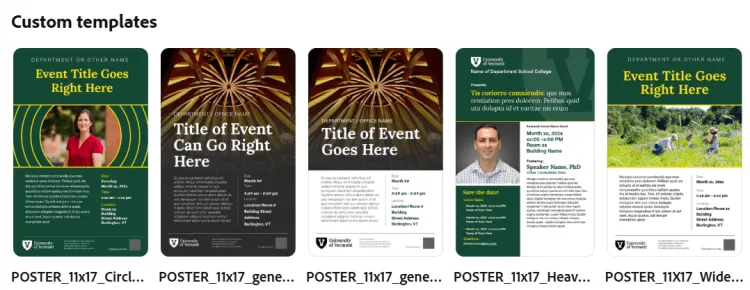
Get a head start with ready-to-use design templates built for versatility and consistency. Designed in Adobe Express, these templates make it easy to create on-brand visuals for posters, social media, digital screens, and more.
Start with a template, customize with your content, and quickly produce polished materials that feel cohesive across every channel.
View Design Templates in Adobe ExpressDownload Design Templates in Adobe InDesignWhy Adobe Express and not Canva? At the moment Strategic Communications utilizes Adobe products for professional design work; because Adobe Express is a part of this suite this allows us to quickly produce templates at no additional cost—and because Express is Adobe's Canva-adjacent product the product remains accessible to those with no design training. Still need help? Here are a few training resources to get you started:
University Name Tag Template
Name tags make connections easier. They create a welcoming, inclusive environment, help people remember names, and set a professional tone for any event. Having uniform name tags across the institution helps improve recognition of official UVM community members. View an example mock-up of UVM's branded name tag (pdf). 3.25'' x 1.75'' Illustrator Template (NetID Required) 3.25'' x 1.75'' InDesign Template (NetID Required)3.25''. 1.75'' Adobe Express Template
How to order: You can order directly from a vendor from artwork you create using the templates above; If you need assistance producing and ordering name tags please reach out to the UVM Bookstore who can help facilitate an order.
University Stationery
Official university stationery reinforces UVM’s identity, builds trust, and adds professionalism to formal communications. It creates a cohesive experience and reflects institutional pride. Stationary Templates (NetID Required)
How to order: UVM Print and Mail has all stationary templates on file and can help produce and print any stationary you require.
Vehicle Decals
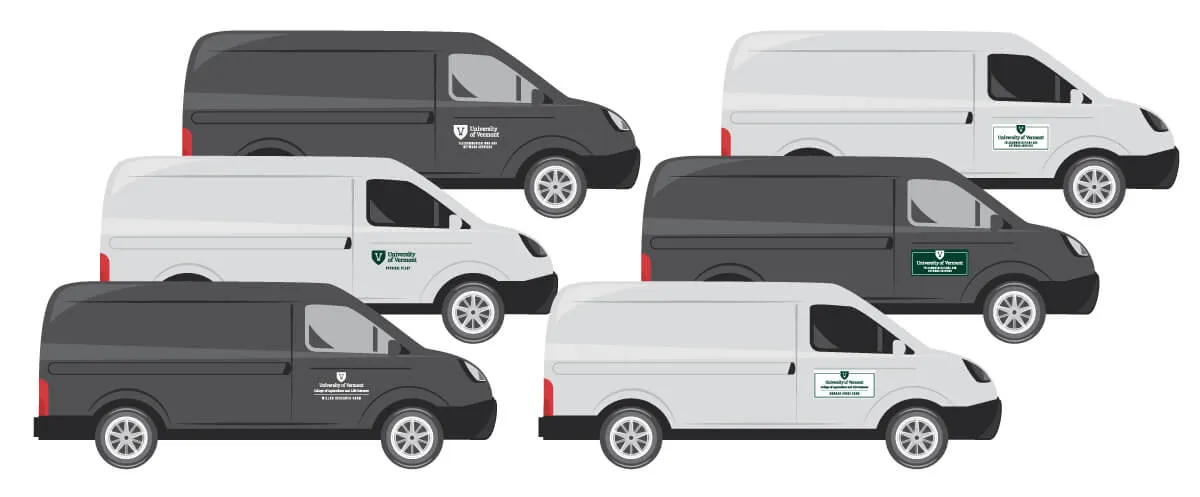
Official University of Vermont vehicles are more than just transportation—they’re moving representations of our brand. Consistent, quality artwork ensures that every vehicle reflects the professionalism and integrity of the university. Clear, uniform branding helps strengthen recognition, build trust, and maintain a cohesive visual identity wherever our vehicles travel.
To make it easy for departments and units to apply UVM branding correctly, we provide downloadable templates designed for vehicle graphics. These templates follow official brand standards and help ensure accurate sizing, placement, and color consistency.
Application Materials: When branding university vehicles, choose the application method that best suits your needs and budget while maintaining quality:
- Die-Cut / Vinyl Applications (Preferred)
Vinyl graphics offer a clean, professional, and modern look—and long-lasting durability. As a result this option comes at a higher cost. With this application only the text and logo elements are applied to your vehicle allowing the color of the vehicle to provide the background (e.g. no 'box'). They are the recommended option for permanent branding on university vehicles. - Stickers
Stickers can be a cost-effective solution for temporary or smaller-scale applications. While not as polished as vinyl, they still provide a way to maintain brand visibility. This application will likely require a 'solid' green or white background that may not match your vehicle color. - Magnets
Magnetic graphics are ideal for vehicles that require removable branding. They offer flexibility but may not adhere as securely as vinyl, especially in harsh weather conditions. This application will require a 'solid' green or white background that may not match your vehicle color.
How to order: Contact UVM Transportation and Parking Services at parking@uvm.edu so they can be aware of your branded vehicle - and support you with recommended vendors for application of your artwork.
Brand Assets
Brand Guide
A brand guide is the blueprint for how UVM presents itself to the world. It defines our logos, colors, typography, and tone, ensuring every communication reflects a consistent, professional identity. Following these guidelines strengthens UVM’s reputation, simplifies the creative process, and helps us speak with one clear, unified voice.
University Logos and Marks
UVM logos are the cornerstone of UVM’s visual identity. Primary logos represent the official university mark, while secondary logos provide flexibility for specific departments or programs. Using the correct logo ensures consistency, reinforces brand integrity, and helps UVM present a unified, professional image across all communications. Read more about our University Logos.
Download University Primary Logos (NetID Required)
Download University Secondary Logos (NetID Required)
Download UVM Monogram (NetID Required)
Brand Fonts
Typography is a key part of UVM’s brand identity. Using the official university fonts ensures consistency, readability, and a professional look across all materials - from posters and graphics to PowerPoint presentations. Following these standards helps maintain a unified voice and strengthens UVM’s visual presence. Read more about UVM's Brand fonts. Download Lora from Google Fonts
Download Acumin VF from Adobe Fonts
Download Roboto from Google Fonts
Brand Swatches
Our official color palette is a key part of UVM’s identity. Adobe swatch files make it easy to apply these colors accurately in your designs, ensuring consistency across all materials. Using the correct brand colors reinforces recognition, professionalism, and a unified visual presence. Read more about UVM's brand colors. Adobe Creative Cloud Swatches (NetID Required) How to Load Swatches in Adobe: Photoshop Instructions, Illustrator Instructions, InDesign Instructions.
Please Note: When working with colors you will want to ensure you are using the correct color profile for your project. In general, digital designs (social media, digital signs) should be produced in RGB, print projects should use Pantone or CMYK color profiles. In addition to using the correct swatch for these - you will want to ensure your design file is set to work in that color profile.