
 Apple and UVM only officially support the three most recent versions of macOS. To see which versions of macOS are the latest as well as which macOS is installed on your device, see this Apple support page. You can check the macOS compatibility of your computer using the links at the bottom of that page.
If you are running an older version of macOS, and your device does not meet the requirements for one of the three most recent versions, it is no longer receiving security or stability updates. Running out-of-date, unpatched software, including operating systems, puts your data and the university at increased risk, and the university may restrict network access for devices running unsupported operating systems.
- Further reading — Apple security updates
Which macOS version is installed?
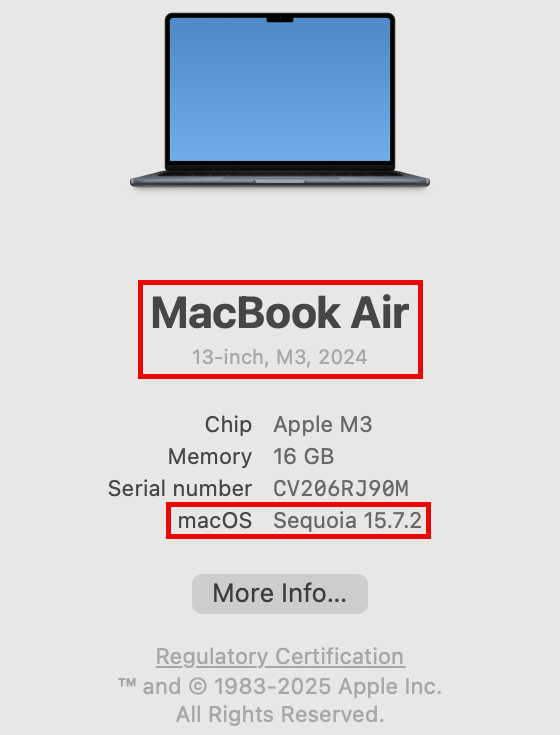
- From the Apple menu in the top left corner of your screen, choose About This Mac.
- You’ll see the macOS name and version number (“macOS Sequoia 15.7.2” in the example below) as well as the model (“MacBook Air 13-inch, M3, 2024” in the example below).
How to upgrade macOS
MacOS can be upgraded using Software Update. You can find that by opening System Settings, selecting the General tab, clicking Software Update, and then clicking Update Now.
Older computers used the App Store app or System Preferences instead. If your computer does not have System Settings, it could be a sign it’s too old.
Where can I get help with upgrading macOS?
Contact the Tech Team for assistance with or questions about upgrading your machine to a supported version of macOS. Staff and Faculty might be referred to their IT support unit if support is needed beyond basic troubleshooting. You can use the IT Lookup Tool to find out if you are supported by an IT support unit outside of ETS.
Known Issues with Unsupported macOS
Known issues related to running unsupported macOS versions on your computer:
Office 365 and Teams feature updates
Running an unsupported version of macOS may limit access to features of collaboration tools like Microsoft Teams, Outlook, and other Microsoft Office products.
Connection is not private - uvm.edu sites

The macOS operating system has root certificates built into it that allow your browser and other applications to validate the various websites and servers your computer connects to. This establishes a chain of trust that helps to prevent malicious actors from posing as legitimate websites.
Unsupported versions of macOS receive the “Your connection is not private” error. The new root certificate used to validate connections to most uvm.edu sites is not included in older versions of macOS.