
Why do we need permissions and sandboxing?
 Out of the box, Claude Code has no file restrictions configured, so once you approve a prompt or it runs a shell command it can reach sensitive files such as protected University data stored on your computer or authentication keys. Permission rules and the sandbox help keep unapproved data from being read and sent off the machine, or files from being changed or deleted.
If you just want a sensible starting point to copy, see the article on Claude Code Managed Settings to find download/install instructions for UVM managed settings files.
How Claude Code reaches your filesystem
Agentic AI platforms like Claude use “tools” to give models different abilities. A “tool” is a specific action the model is allowed to perform on your system, such as reading a file, editing one, or running a terminal command. The model does not touch your machine directly; it requests a tool, and that tool carries out the action, which is exactly why the controls below matter.
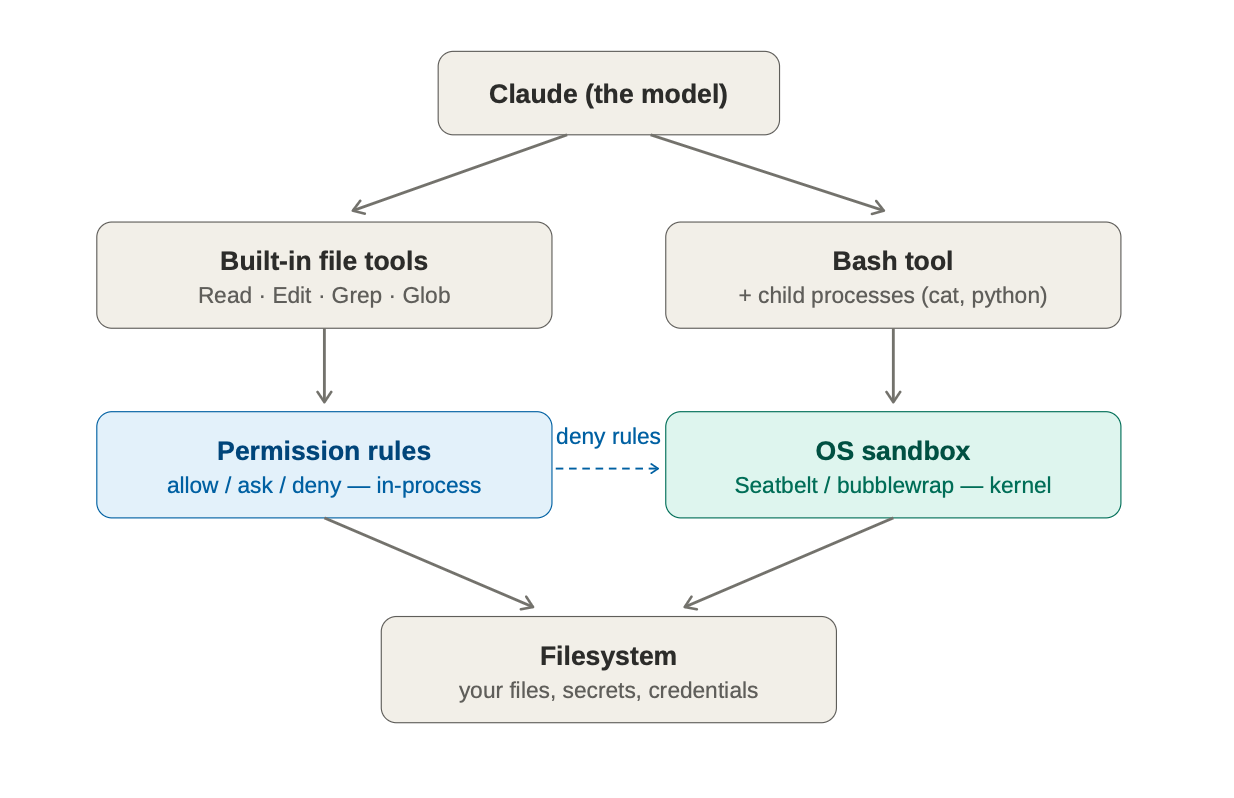
There are two paths to your files. The first is the set of built-in file tools: Read, Edit, Write, Grep, and Glob, which run inside the Claude Code process. The second is the Bash tool and the child processes it spawns, such as cat, python, npm, git, etc.
Each path is governed at a different layer.
- The built-in file tools are governed by permission rules inside the application.
- The Bash tool and its child processes are governed by the operating system sandbox.
Both paths ultimately reach the same files, including secrets and other potentially sensitive or protected data. A control that covers one path does not automatically cover the other.
Permission rules (application layer)
Permission rules govern the built-in Read, Edit, Write, Grep, and Glob tools. They also gate every other tool, including Bash, WebFetch, and MCP, before it runs. Rules use allow, ask, and deny lists with Read() and Edit() path syntax, and they are evaluated in the order deny, then ask, then allow.
Permission rules are enforced inside the Claude Code process, before the tool runs. A managed deny is absolute, which means users cannot re-allow it. Use a permission deny for any path Claude should never touch.
The built-in OS sandbox (Bash and its child processes)
The built-in sandbox governs Bash commands and all of their child processes, such as cat, python, npm, git, etc. It does not govern the built-in Read tool. It is enforced by the operating system kernel, and the restriction holds regardless of what the command tries to do. The built-in sandbox runs on macOS, Linux, and WSL2; it is not available on native Windows.
Sandbox filesystem rules (denyRead, allowRead, denyWrite, allowWrite) merge across scopes, and allowRead beats denyRead.
Which control covers what
| Control | What it governs | How it is enforced | Can users override it? |
|---|---|---|---|
Permission rules allow,ask,deny, (Read() Edit()) |
The built-in Read, Edit, Write, Grep, and Glob tools. Permission rules also gate every other tool, including Bash, WebFetch, and MCP, before it runs. | Inside the Claude Code process, evaluated before the tool runs. | A managed deny is absolute. Users cannot re-allow it. Use it for paths Claude should never touch. |
Sandbox filesystem denyRead,allowRead,denyWrite,allowWrite |
Bash commands and all their child processes (cat, python, npm, git). It does not govern the built-in Read tool. |
By the operating system kernel: . The boundary holds regardless of what the command does. | Rules merge across scopes and allowRead beats denyRead, so users can widen access |
Additional documentation
- Sandboxing reference: code.claude.com/docs/en/sandboxing.
- Permissions reference: code.claude.com/docs/en/permissions. Covers Read and Edit rules