The Challenge with Making Equations Accessible
Equations used in the various branches of mathematics and science are a challenge for conventional digital accessibility tools and principles. There are three reasons for this. One, equations fill one line with several levels of text. This is not the behavior that standard assistive technology has been trained to understand. Two, not all of the UNICODE representations for all symboles are familiar to all screen readers. So they're not universally accessible in that format. And three, equations are largely context-dependent. In other words, one equation can mean entirely different things in two different disciplines.
Take the following very simple equation, shown here as a flat image (with alt-text):
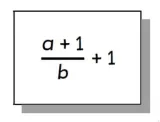
The alt-text for this image reads: "Equation: traditionally read as a plus one over b plus one". But that alt-text fails to capture that in this particular equation, b is a denominator to a+1. The alt-text creates semantic ambiguity, as the reader or listener may not be able to determine whether the denominator in this equation is "b" or "b+1". And these are very different things. Additionally, most screen readers will pronounce "a" as [uh] rather than [ay], which can cause additional confusion.
Equations include structure, reading order, operators, subscripts and superscripts, and intent.
Intent and Equations
When we talk about intent in equations, we're recognizing that the same equation can have entirely different meanings, depending on the genre in which it's being used. Take the following flat image of an equation:
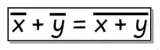
The alt-text for this equation is currently: "Equation bar over x plus bar over y equals bar over the quantity x plus y". But the intent behind the equation is germane to its representation. In a Statistics course, for instance, it would be more appropriate to say this image represents "Equation mean of x plus mean of y equals the quantity mean of x plus y". But in an Algebra course, that would not be appropriate. Instead the intent of the equation would be more appropriate to talk about the complex conjugate of x instead.
Tools for Creating Accessible Equations
MathType for Microsoft
If you are creating a Word or Powerpoint document, UVM recommends using the MathType Editor. This is an installable extension that adds an equation editor to the Microsoft 365 Office suite. MathType creates equations that render as MathML in the Microsoft document.
The video below shows a demonstration of what chemistry equations can sound like when created using the MathType Editor for Word, and read using the MathPlayer browser extension with the NVDA screen reader. MathPlayer reads specifically equations written in MathML. NVDA is a free screen reader for the Windows platform.
MathPix
MathPix is a free, standalone tool that will take photos of documents and render the handwriting as natural language. It will also render hand-written equations as digital equations laid out in LaTeX. You can scan your handwritten documents into MathPix, then export them as .pdfs. The video below gives a demonstration of how MathPix works to take a handwritten document with equations through to a digital version.
MathPix can also digitize hand-written chemical diagrams to digital versions. The video below shows a demonstration of this function, complete with a walkthrough of workflow, moving hand-written diagrams to SMILES code.
Images of Equations and Alt-Text
If you want to include an equation as a flat image, such as a .png or .jpg, you need to include alt-text for that image. The alt-text should be as close to natural language as possible. And as we learned at the beginning of the page, you have to write your alt-text as precisely as possible in order to avoid introducing ambiguity into your equations.
For instance, in our equation image from the top of the page:
A better way to express the actual layout of the equation in alt-text would be: "Fraction a plus 1 over b end fraction plus 1". This text accurately expresses that there is a fraction plus an integer in this equation; in this version of the alt-text there is no doubt that b is the denominator of the fraction, not b + 1.
Making LaTeX Accessible
For writing and editing LaTeX, OAS recommends using either MathPix or the LaTeX Overleaf editor, and exporting to HTML or a .pdf. HTML provides the most accessible solution, as web browsers provide people with accessibilities with the most flexibility in terms of font formatting, color, family, and size, as well as a high degree of easy compatibility with assistive technology such as screen readers. While .pdfs are documents that provide multiple challenges for accessibility, OAS recognizes that they are still frequently used and depended on at the University. Overleaf and MathPix both create .pdfs with LaTeX that are “PDF-UA-ready", meaning that some of the accessibility work has been addressed by the software, leaving less items that need to be manually remediated.
The new Yuja Panorama automated accessibility checker that will replace Ally in Brightspace will also provide a way for instructors to create and distribute LaTeX equations in largely accessible documents. The LaTeX Tagging Project in particular provides guidelines for creating accessible .pdfs with LaTeX, as well as instructions as to how to use LaTeX to produce accessible .pdfs.
MathML and Word Documents
For faculty who prefer to write MathML, OAS recommends the MathType Word document extension in combination with Microsoft’s Accessibility Assistant to generate accessible Word documents.