Video and audio content can help make webpages, social media, and course content more engaging -- as well as creating additional paths to inclusion for learners who prefer multimedia content. Here's how to make your video and audio content accessible.
Video Accessibility by Content Type
Per WCAG 2.1 AA-level requirements:
- Videos with spoken dialogue need fully accurate captions
- Videos with visual content but no spoken dialogue need audio description
- Videos with one scene of visual content and no spoken dialogue need text descriptions
Audio Accessibility by Content Type
Per WCAG 2.1 AA-level requirements:
- Audio with spoken dialogue needs a fully accurate transcription
- Audio with no spoken dialogue needs a text description
Creating and Choosing Multimedia at UVM
At UVM, if you are creating multimedia, you are responsible for making sure it is fully accessible. If you are a UVM student creating multimedia for a course, please contact OAS if you need help making your multimedia accessible.
Accessible Videos
Captions
Captions are a text version of the spoken audio.
They also include descriptions of important sounds, synchronized with the video.
Captions must be available in order to ensure audio content is accessible to people from the Deaf and Hard of Hearing community.
They also help:
- People learning English
- People who process information better if presented in multiple modes (sound and text)
- People with cognitive and developmental disabilities, especially those related to vocabulary
- People with audio processing disorders
- People with certain types of dementia
- People with certain types of autism spectrum disorder
- People who have the sound turned off on their devices
- People watching videos in noisy environments
Automated captions are not enough
At this point, automated captions are not enough to meet the WCAG 2.1 AA-level requirements for public entities. OAS strongly recommends that UVM staff, faculty, students, and departments take advantage of OAS' free captioning service to get fully accurate captions for all videos.
Please use closed captions instead of open captions
Closed captions are captions that users can turn on and off. Closed caption tracks allow users to customize the size, color, font, and background of captions. Closed caption tracks can also be accessed by screen readers.
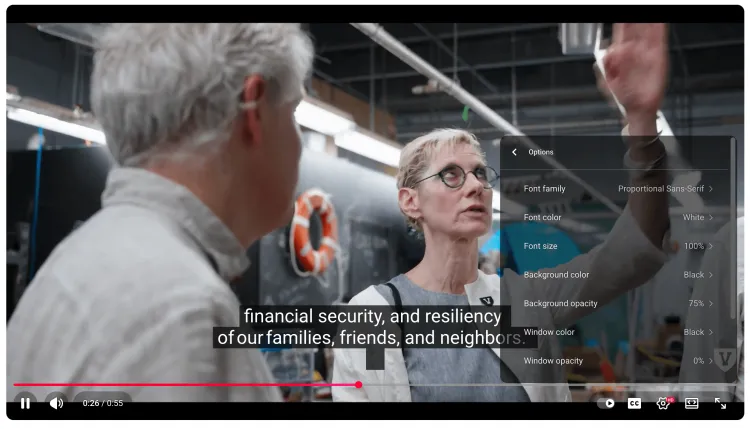
The image above shows the different customization options for closed captions that come with the YouTube player. They include: font family, font color, font size, background color, background opacity, window color, and window opacity.
Open captions are not enough to meet the WCAG 2.1 AA-level requirements for public entities. Open captions are captions that users can't turn on and off. They are often referred to as being "burned in" to a video; they're permanent. Open caption tracks don't allow users to customize the captions, and open captions cannot be accessed by screen readers.
Subtitles
Subtitles are not the same as captions
Subtitles are similar to captions, but are used for translating spoken content into another language.
If subtitles are available for a video, they’re typically provided in a list of languages, accessed via the closed-caption button on the media player. Some media players erroneously use the term subtitles when referring to captions.
Audio description
Audio description is for videos with no dialogue
Audio description is a separate narration track that describes the visuals in a video for people who are blind or low vision. If a video has no dialogue, it needs audio description for the visual content.
Videos that need audio description are generally highlight reels and social video memes.
Audio description also benefits:
- People who are visually distracted
- People watching a video in the background while multitasking
- People with some types of autism spectrum disorder
OAS offers free audio description services for UVM students, staff, faculty, and departments.
Accessible Audio
Transcripts
Transcripts are text versions of audio content
Without a transcript, many d/Deaf, Hard of Hearing, and Deafblind people cannot access audio content.
Additionally, transcripts benefit:
- People accessing the web using a Braille device
- People with slow Internet connections or other technical issues that prevent media from playing
- People searching the content for specific information
A transcript should contain every piece of dialogue that occurs in an audio file. Transcripts should be formatted to indicate when speakers change, which speaker said what, and they should include any meaningful non-speech sounds. A good rule of thumb is to format a transcript like a play or movie script, or a magazine interview.
OAS provides free transcription services for UVM students, staff, faculty, and departments.
Text Descriptions
Provide text description for non-dialogue audio
If an audio file has no spoken dialogue, it needs a text description in order to be accessible. For example: an audio file containing nothing but whale sounds should also have a text description describing the audio content. In this case it can be as simple as "Audio of whale sounds: moans, growls, deep rumbles, and high-frequency clicks and whistles."
Upcoming Workshops & Classes on Accessible Multimedia
