Memory hierarchy
Main memory is slow
Memory access is one of the slowest operations in a modern system:
- registers read / write: \sim 0.1 ns (sub-nanosecond read / write), < 1 clock cycle;
- main memory (DRAM): \sim 150–300 clock cycles; and
- disk storage (SSD/HDD): hundreds of thousands (SSD) to millions (HDD) of clock cycles.
DRAM access latency is typically 50–100 ns, which at 3 GHz corresponds to 150–300 cycles. Latency arises from signal propagation, memory controller scheduling, row activation, and bus turnaround. Each of these steps takes time.
This is why modern systems use caches. Caches are fast intermediate storage between CPU and main memory. They are used to store frequently accessed data and instructions.
| cache level | latency | approx. cycles | typical size |
|---|---|---|---|
| L1 | 1 ns | \sim 3 cycles | 192 KB instruction / 128 KB data |
| L2 | 3–5 ns | \sim 10–15 cycles | \sim 1–4 MB per core |
| L3 / SLC | 10–15 ns | \sim 30–45 cycles | varies considerably |
The cache hierarchy forms a latency–capacity tradeoff: L1 is the smallest and fastest, L3 (or SLC, system level cache on Apple Silicon) the largest and slowest. The L1 sizes in the table are those of Apple Silicon performance cores; other designs differ.
Locality of reference
Caching is feasible because of what is called locality of reference. In the ordinary course of operations, a processor tends to access the same set of memory locations or nearby locations repeatedly over a short period of time. Temporal locality refers to recurring reads of the same memory location within a short period of time. Spatial locality refers to recurring reads of nearby memory locations. Were it not for locality of reference, caching would be useless. A cache is where we store data that’s likely to be needed again in the near future.
There is some guesswork involved, and there are a number of algorithms for managing caches. If the right data are cached, then we save the time spent waiting for memory. We call successful accesses to a cache hits. If the wrong data are cached, then we encounter a cache miss. On a miss, the next level of the cache hierarchy is accessed. If the next level is also a miss, then the next level is accessed. If we continue to miss, then the data are fetched from main memory.
So clearly there are several tradeoffs at work. Cache memory is fast but expensive to build, so caches tend to be small. That’s one tradeoff. The other tradeoff comes down to the balance between cache hits, which can save us hundreds of clock cycles, and cache misses, which can slow us down because we check the cache or caches first (which takes time) and then still have to fetch the data from main memory (so no time is saved on a miss, and some is lost).
Even though caches are slower than registers, they are still much faster than main memory. They effectively make it appear that most data accesses occur at near-register speeds.
Conceptual model and measure of memory access time
A cache stores memory blocks that the processor has recently used or is likely to use soon. Each block of memory is stored in one or more possible cache locations determined by its address.
\text{CPU} \leftrightarrow \text{L1 cache} \leftrightarrow \text{L2 cache} \leftrightarrow \text{L3 cache} \leftrightarrow \text{main memory} \leftrightarrow \text{non-volatile storage}
We descend deeper into the hierarchy until we reach the data required by the request. If the data are found in the L1 cache, then the data are returned to the CPU immediately. If the data are not found in the L1 cache, then the L2 cache is checked. If the data are found in the L2 cache, the data are returned to the CPU. If the data are not found in the L2 cache, then the L3 cache is checked, and if data are found, they are returned to the CPU. Otherwise, the data are fetched from main memory (or perhaps even from non-volatile storage).
The performance of a cache is characterized by three parameters:
- hit rate (number of hits divided by number of accesses) or miss rate (number of misses divided by number of accesses),
- hit time, and
- miss penalty.
Hit rate and miss rate are complementary—they necessarily sum to one.
Average memory access time, t_{AMA}, is given by:
t_{AMA} = t_{hit} + (r_{miss} \times p_{miss})
where t_{hit} is the hit time, r_{miss} is the miss rate, and p_{miss} is the miss penalty.
So let’s say, without worrying about specific time units, that the hit time is 1.0 time units, and the cache miss rate is 0.25, and the penalty is 4.0 time units. Then t_{AMA} is:
t_{AMA} = 1.0 + (0.25 \times 4.0) = 1.0 + 1.0 = 2.0 \text{ time units}.
It should be clear from this that apart from decreasing the hit time directly, the only other ways to decrease t_{AMA} are to decrease the miss rate or the penalty (or both). Let’s set aside the penalty for now.
How would we decrease the miss rate?
One way is to increase the size of the cache. Another way is to increase the number of locations in which a given block may be placed—that is, to increase the cache’s associativity.
Cache mapping strategies
Caches use address bits to determine where each block is stored. Three main strategies exist, differing in flexibility and hardware complexity.
- Direct-mapped cache:
- Each block has exactly one possible location.
- Simple and fast, but prone to conflict misses.
- n-way set-associative cache:
- Each block can go into one of n locations within a set—each set holds n blocks.
- Balances flexibility and lookup cost.
- Fully associative cache:
- Any block can go anywhere.
- Eliminates conflicts but requires associative lookup hardware.
In most designs, L1 caches are small and moderately associative (typically 4- to 12-way), while L2 and L3 caches are larger and often more associative (commonly 8-way or higher).
Direct-mapped cache
Suppose our word size is 32 bits, and memory is byte-addressable. This means there are four bytes that can be addressed within each word (4 \times 8 = 32).
Further suppose that we have a 4 KB direct-mapped cache with 16-byte blocks. If each block holds 16 bytes (four words), then our cache will hold 256 blocks (4 KB / 16 bytes = 4096 / 16 = 256).
The cache is organized into cache lines, with each line containing one block plus metadata. Each cache line is identified and selected by an index. In this example, there are 256 lines, with indices 0–255. The index is not stored in the line; it is simply the line’s position in the cache. In addition to a 16-byte data block, each cache line also stores additional metadata: a “tag”, a “valid” bit, and in some cases, a “dirty” bit (we’ll see more on this later).
When we first turn on the computer, the cache is filled with garbage—random, uninitialized bits—so each line has the valid bit unset (0).
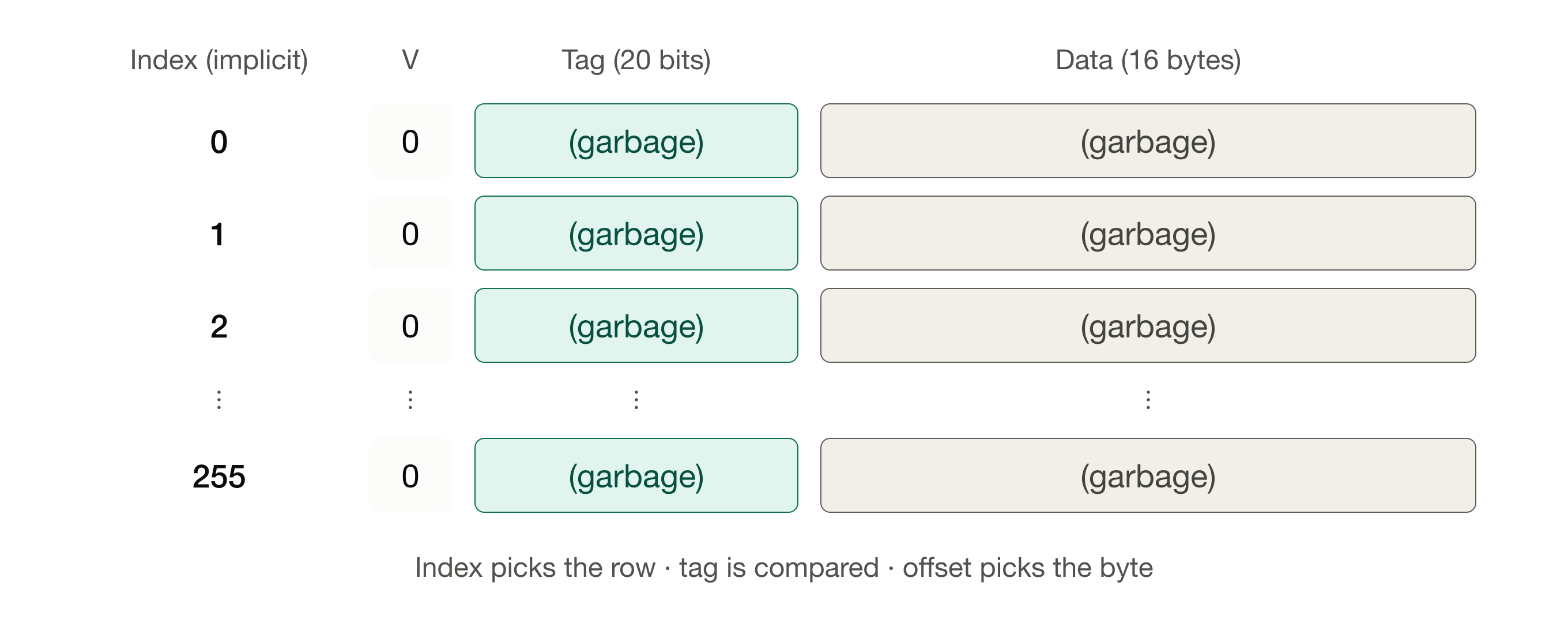
Now, given the cache in this state, consider what happens if the CPU requests data at address 0x00F40020. The cache is checked but all valid bits are set to zero, so there’s effectively nothing in the cache. This constitutes a cache miss.
So the request proceeds to main memory, and the requested data are fetched. Because we had a cache miss, the fetched block will be loaded into the cache (a cache fill).
Now, what happens when a block is loaded into the cache? Because here we have 256 cache lines, and these are indexed 0–255, we need eight bits to select a line (256 = 2^8). But which eight bits? Where will our data go in the cache? Given the design under consideration, we’d divide an address into the following fields:
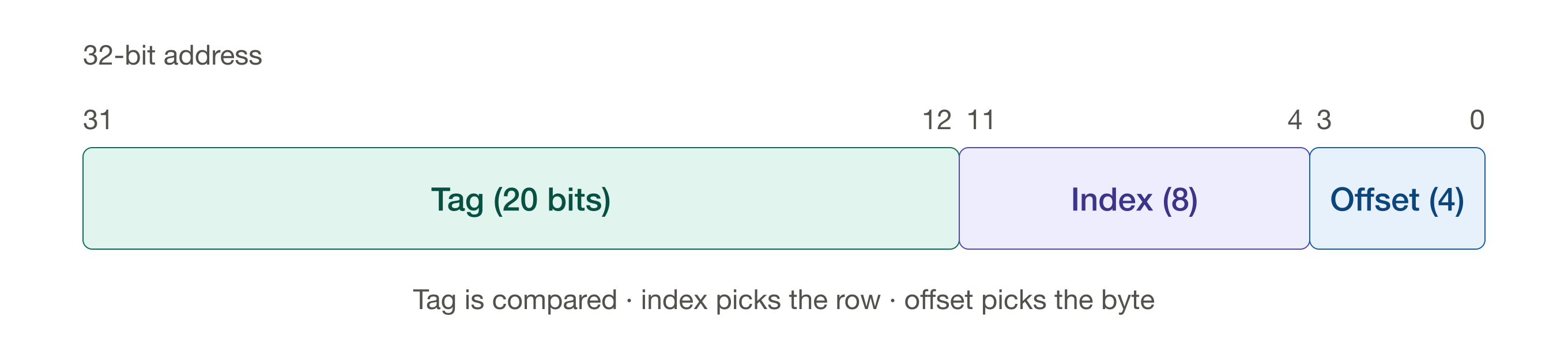
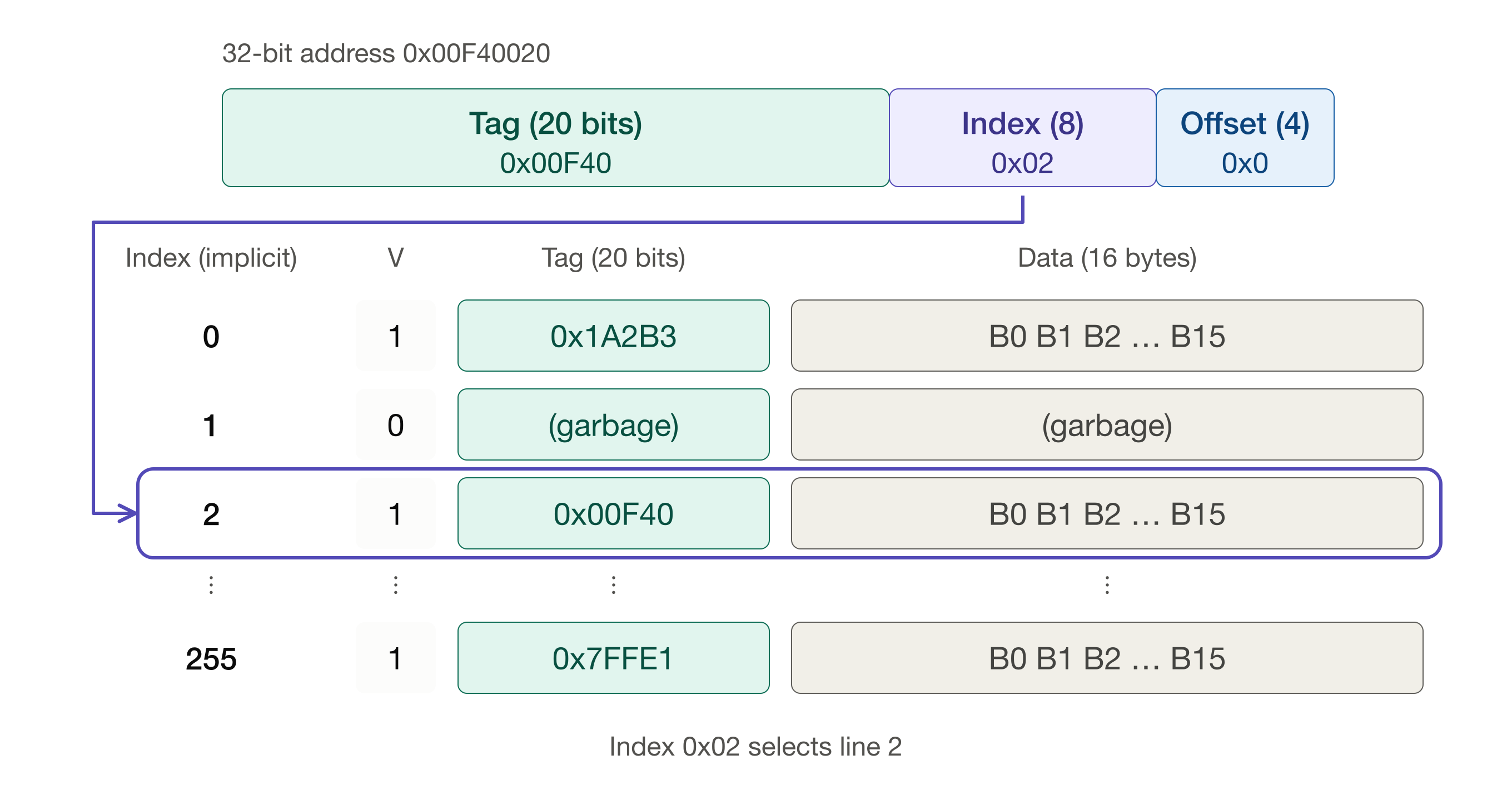
The tag field is 0x00F40 (five nibbles, 20 bits). The index field is 0x02 (two nibbles, eight bits). The offset field is 0x0 (one nibble, four bits).
The two nibbles for the index are used to select the cache line that will hold these data. So in this example we’re selecting cache line 2 (0x02 = 2). The tag field from the address (0x00F40) is stored in the tag field of the cache line. The 16 bytes of data starting at address 0x00F40020 are copied into the data block within the cache line, and the valid bit is set to 1.
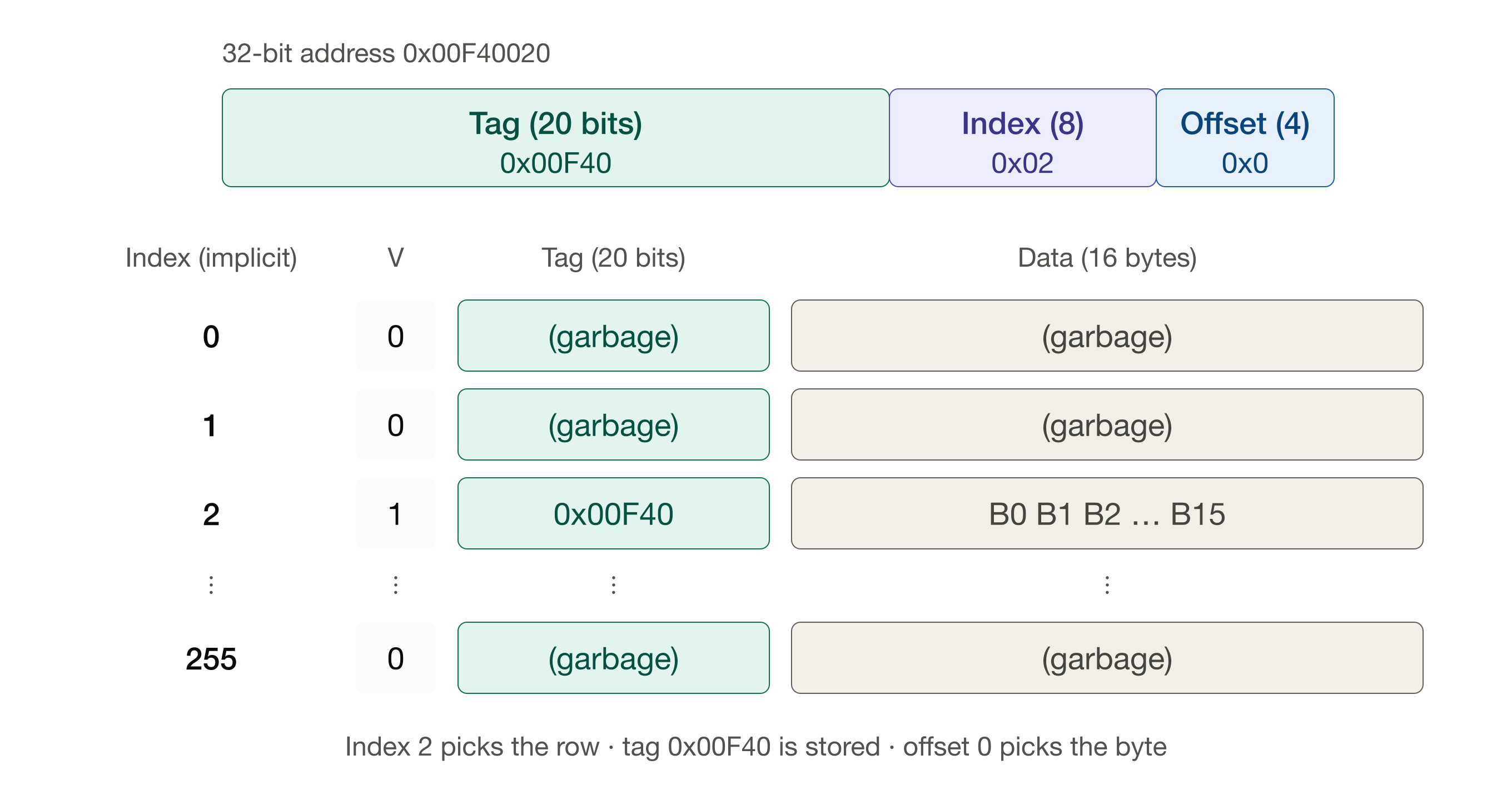
So, again, each line is selected by the index field of the address. Within each block, the offset (the lowest 4 bits) selects a specific byte (or word) inside that block. The remaining upper 20 bits form the tag. Together with the line’s index, the tag uniquely identifies which main-memory block is currently stored in that cache line.
With a few more memory requests and cache misses leading to additional cache fills, we might have a cache that looks like this:
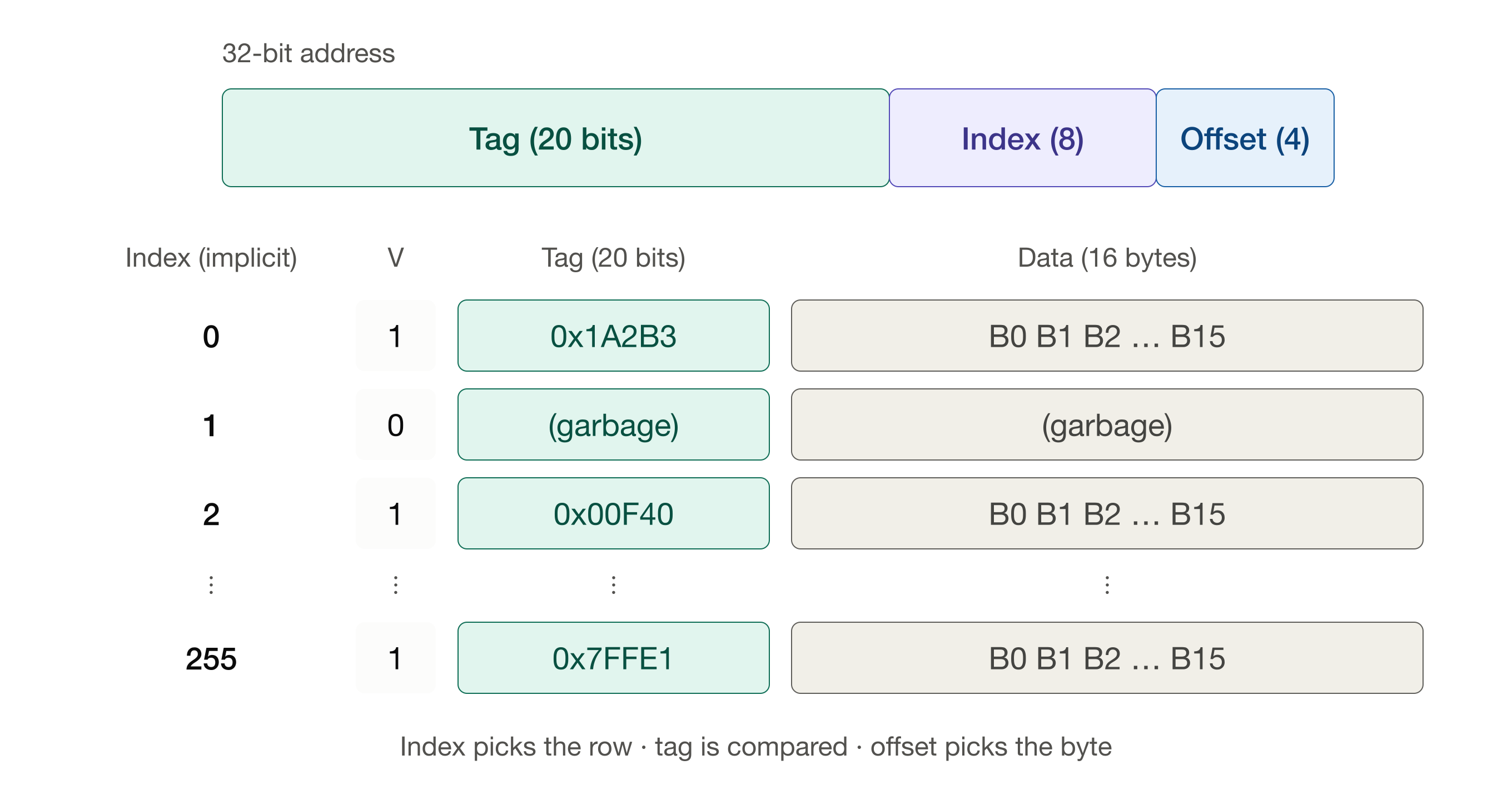
Now that we have some data loaded into the cache, let’s see what happens when the processor requests data that are cached, leading to a cache hit.
When the processor requests data from a given address:
- The index selects a cache line.
- The line’s valid bit is checked, and the tag stored in that line is compared to the address’s tag.
- If the valid bit is 1 and the tags match (a cache hit), the offset selects the requested byte from that line’s data block.
- If the valid bit is 0 or the tags don’t match (a cache miss), the processor fetches the block from main memory and updates that cache line.
First, we use the index bits to select the appropriate cache line:
Then the valid bit is checked and the tags are compared. If the line is valid and the tag stored at the specified cache line matches, we have a cache hit. Why? Because the tag and index together uniquely identify a 16-byte block in main memory, and the valid bit tells us the line actually holds one.
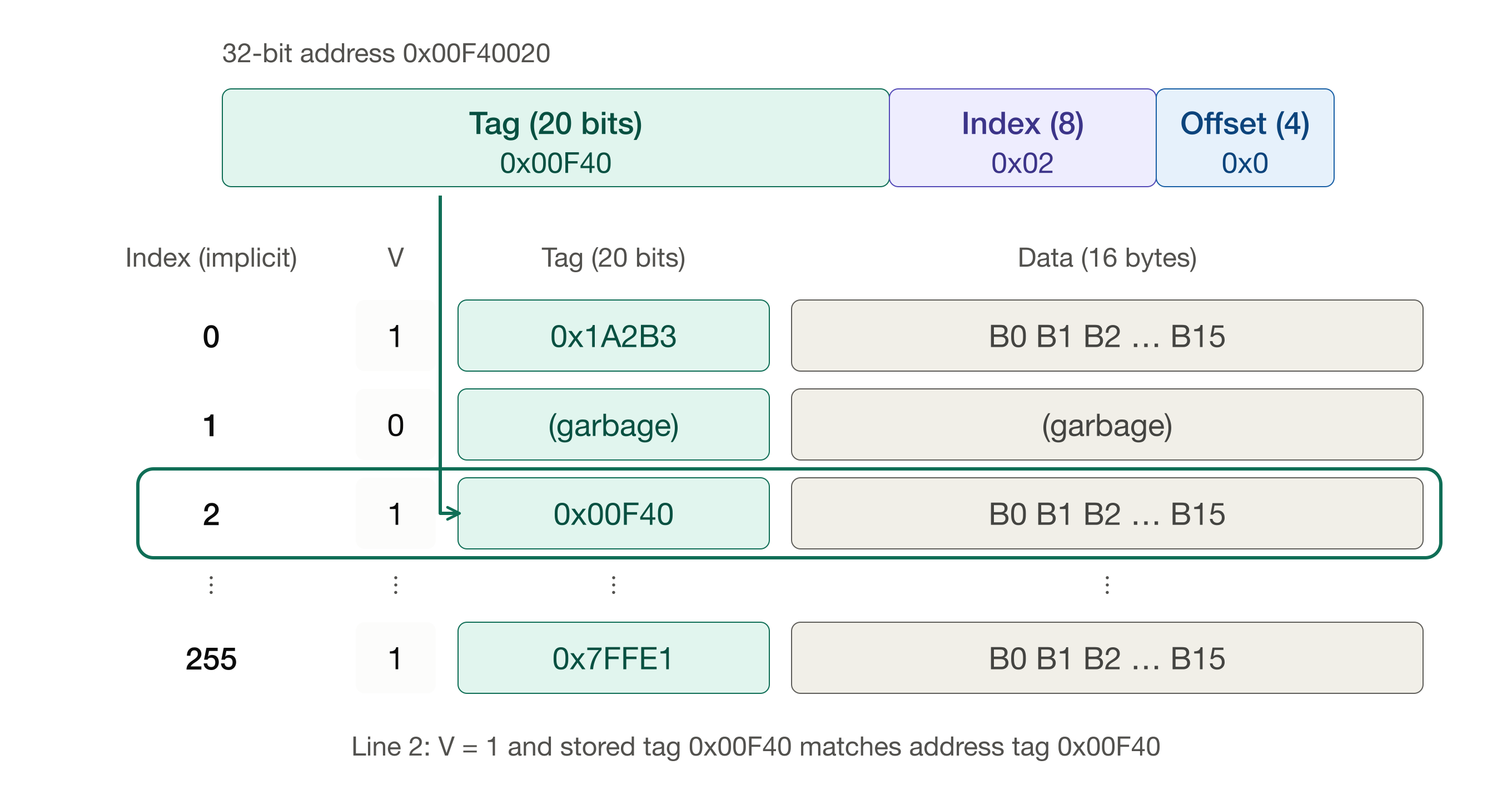
The offset field is used to specify bytes within the cached data block.
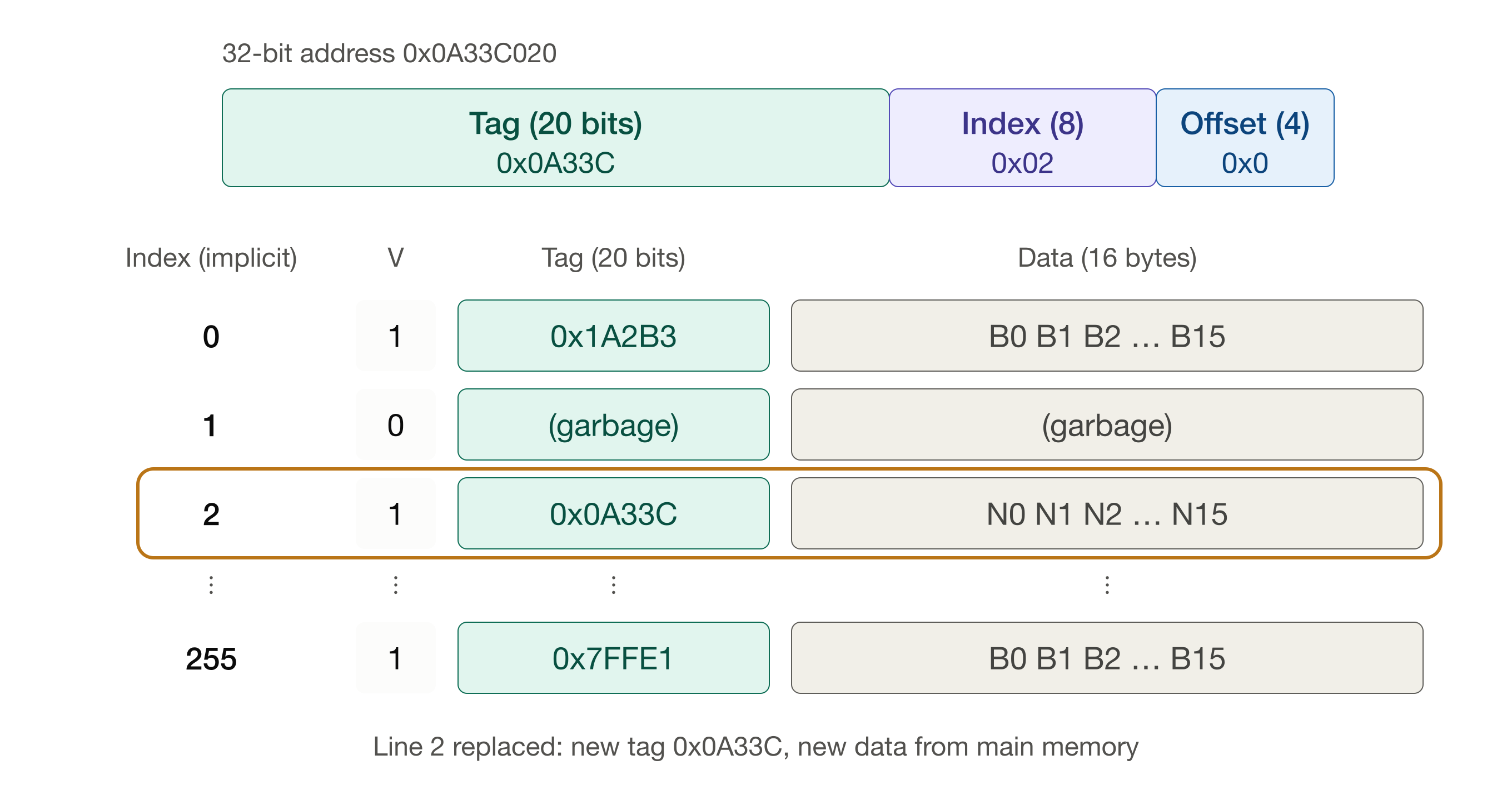
Now let’s see what happens if we request data from a different block with the same index bits. Let’s say now the CPU requests data at 0x0A33C020.
Cache line 2 is selected because the index bits are the same.
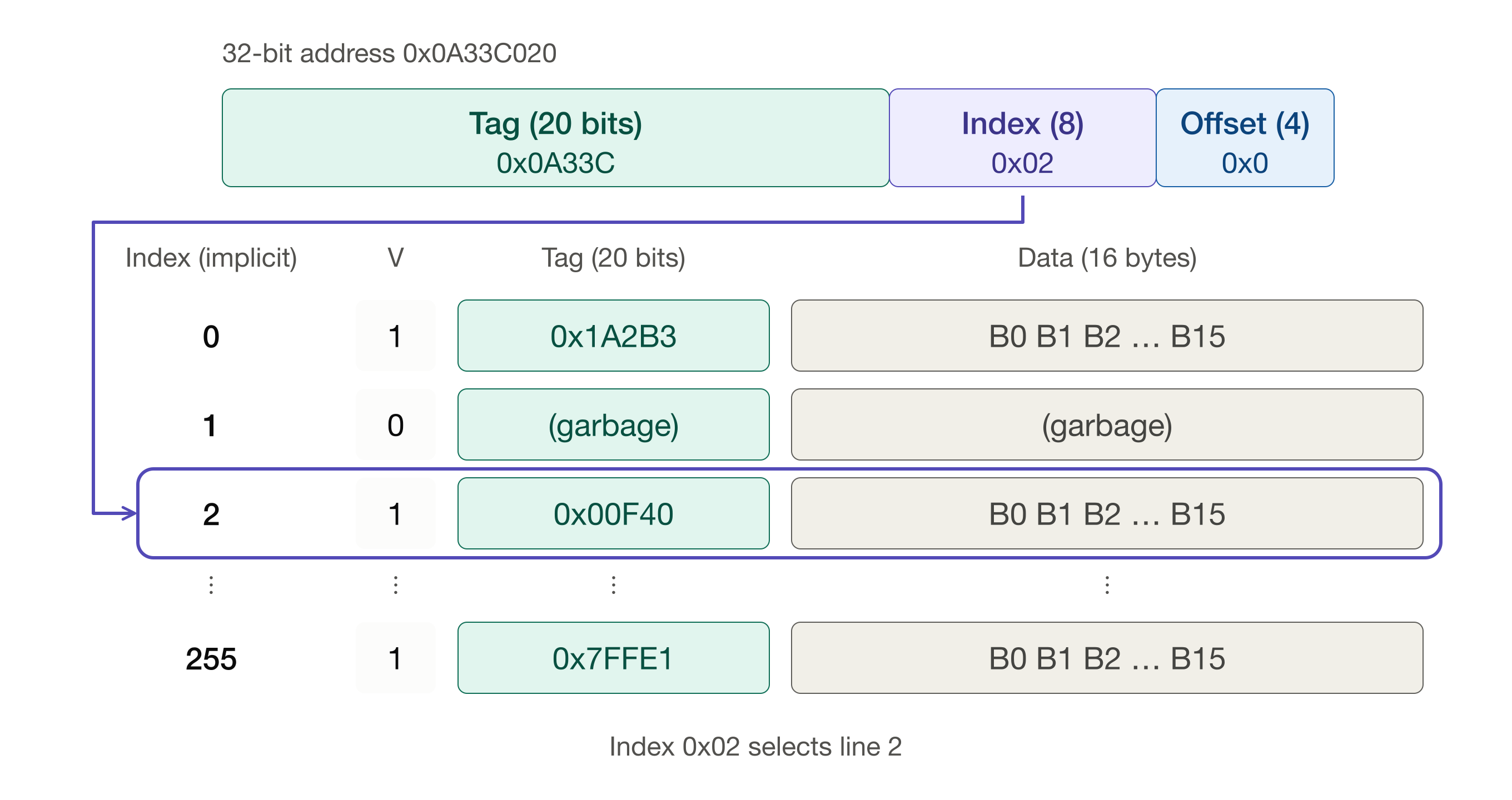
But now we see the tag bits do not agree, so we have a miss.
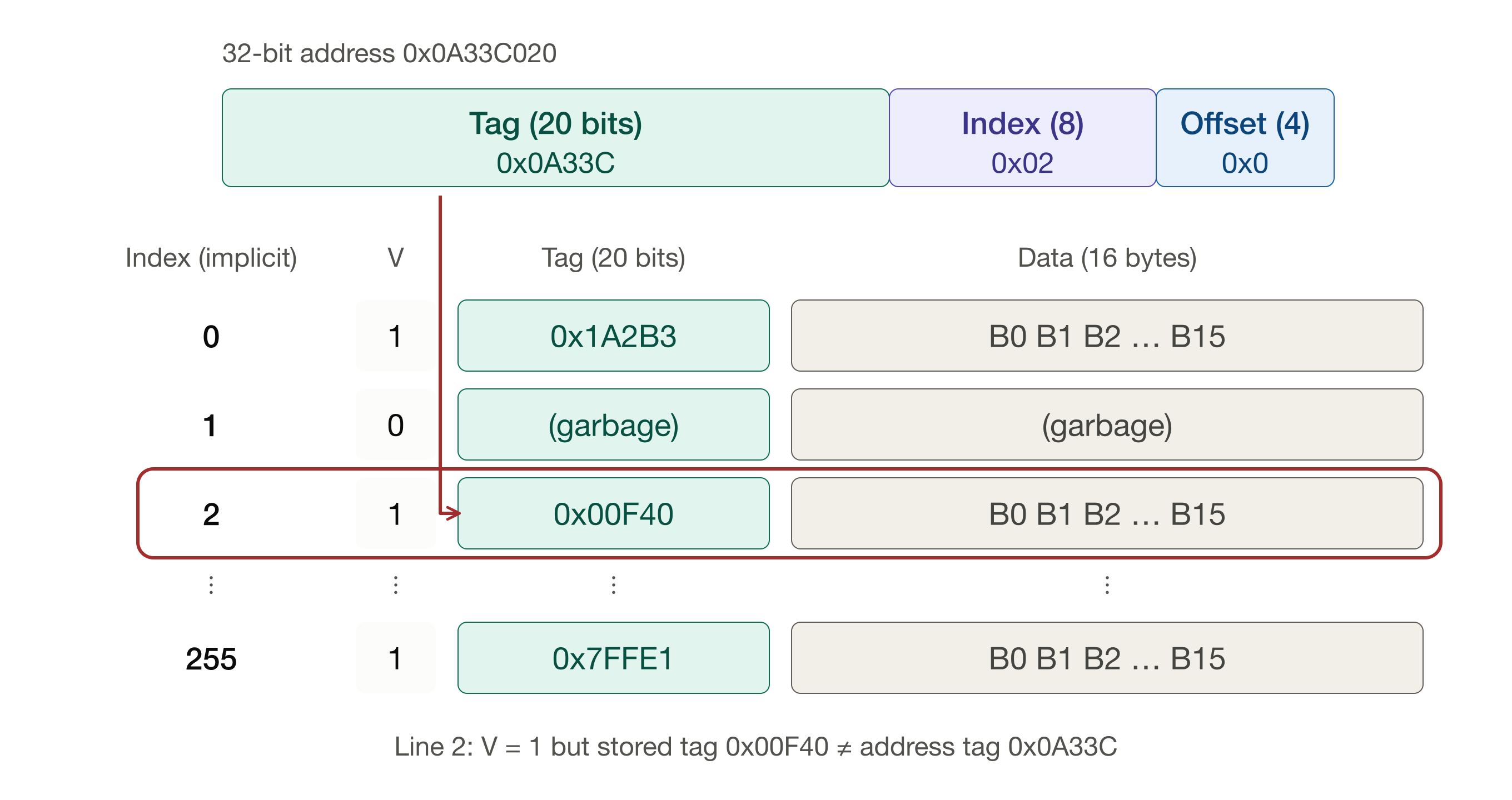
So the request goes to main memory, data are retrieved and the cache line is updated with new data and new tag. We call the replacement of old data with new data an eviction (the old data are evicted to make way for the new data). Whether this miss is a conflict miss is a question we’ll take up in a moment.
Conflict misses and churn
Not every miss is a conflict miss. A miss on a block that has never been in the cache is a compulsory miss (or cold miss). The two misses we just walked through were compulsory: neither block had been loaded before, so no cache design could have avoided them.
A conflict miss is a miss on a block that was in the cache earlier but was evicted because another block competed for the same cache line, even though the cache still has unused space elsewhere. This happens because each block can go only into one specific line. If multiple, frequently accessed addresses map to the same index, they keep evicting each other—causing repeated misses despite the cache not being full. This repeated evicting and reloading is sometimes called churn (or thrashing).
The two addresses we just saw are a good example. 0x00F40020 and 0x0A33C020 differ by 0x093FC000, which is a multiple of the cache size (4 KB = 0x1000), so they always map to the same line. Suppose a program alternately reads from these two addresses, over and over (say, in a loop that reads corresponding elements of two arrays located exactly that far apart). The first read misses and loads line 2. The second read misses, too, and evicts the first block from line 2. Both of these are compulsory misses. The third read misses because we just evicted the block it needs. This is our first conflict miss, and so is every miss after it. Every access is a miss, and every miss evicts exactly the block we’re about to need next.
Using the same numbers as before (hit time 1.0, penalty 4.0), a miss rate of 1.0 gives:
t_{AMA} = 1.0 + (1.0 \times 4.0) = 5.0 \text{ time units}.
That’s five times slower than if every access were a hit, and meanwhile the rest of the cache sits idle. What we’d like is for these two blocks to coexist in the cache. That’s what associativity buys us.
n-way set-associative cache
In a set-associative cache, the cache lines are grouped into sets. The index now selects a set rather than a single line, and a block may be placed in any line within that set. In an n-way set-associative cache, each set holds n lines, and we call each of those lines a way. A direct-mapped cache is simply the special case n = 1.
Let’s keep the same 4 KB cache with 16-byte blocks, so we still have 256 lines in all, but now let’s make it 2-way set-associative. The 256 lines are organized into 128 sets of two lines each (256 / 2 = 128 = 2^7). So we need only seven bits to select a set. The index shrinks by one bit, and the tag grows by one bit (32 - 7 - 4 = 21):
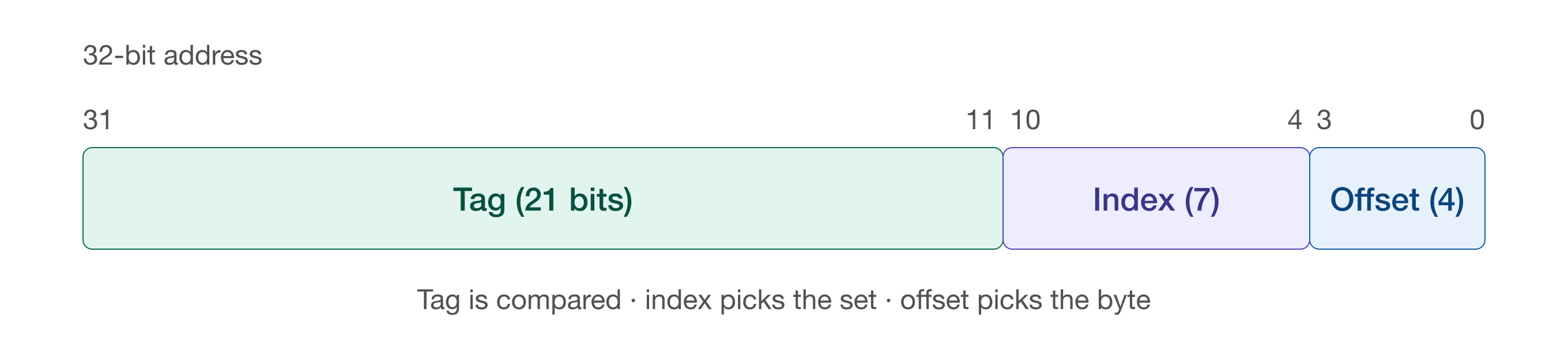
The tag is now 21 bits, the index is 7 bits, and the offset is still 4 bits. The extra bit of tag is the top bit of what used to be the index; for our two addresses that bit happens to be 0. So 0x00F40020 now has tag 0x01E80 and index 0x02, and 0x0A33C020 has tag 0x14678 and index 0x02. Both addresses still select the same place in the cache—this time, set 2.
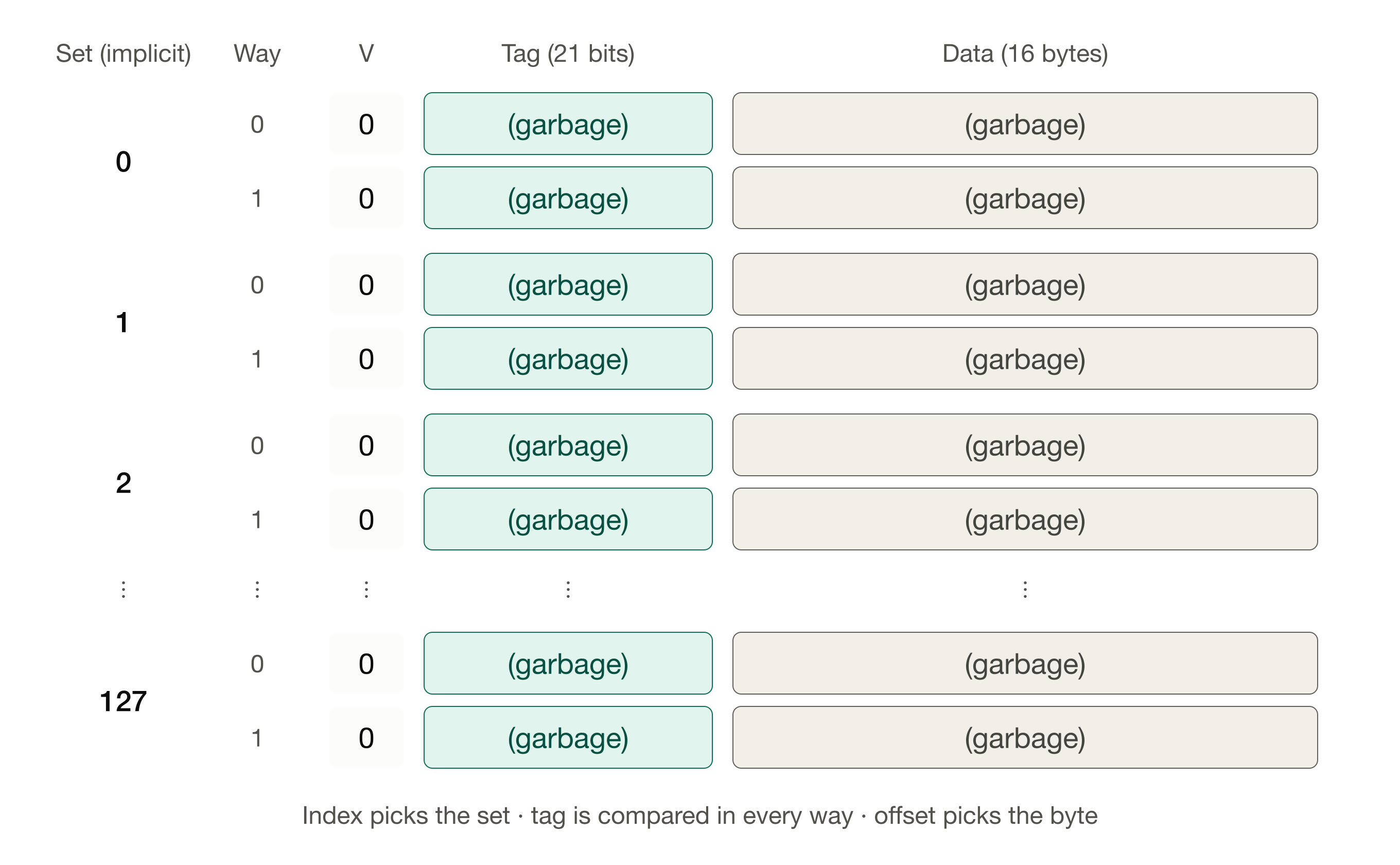
As before, when we first turn on the computer the cache is filled with garbage, and every valid bit is 0:
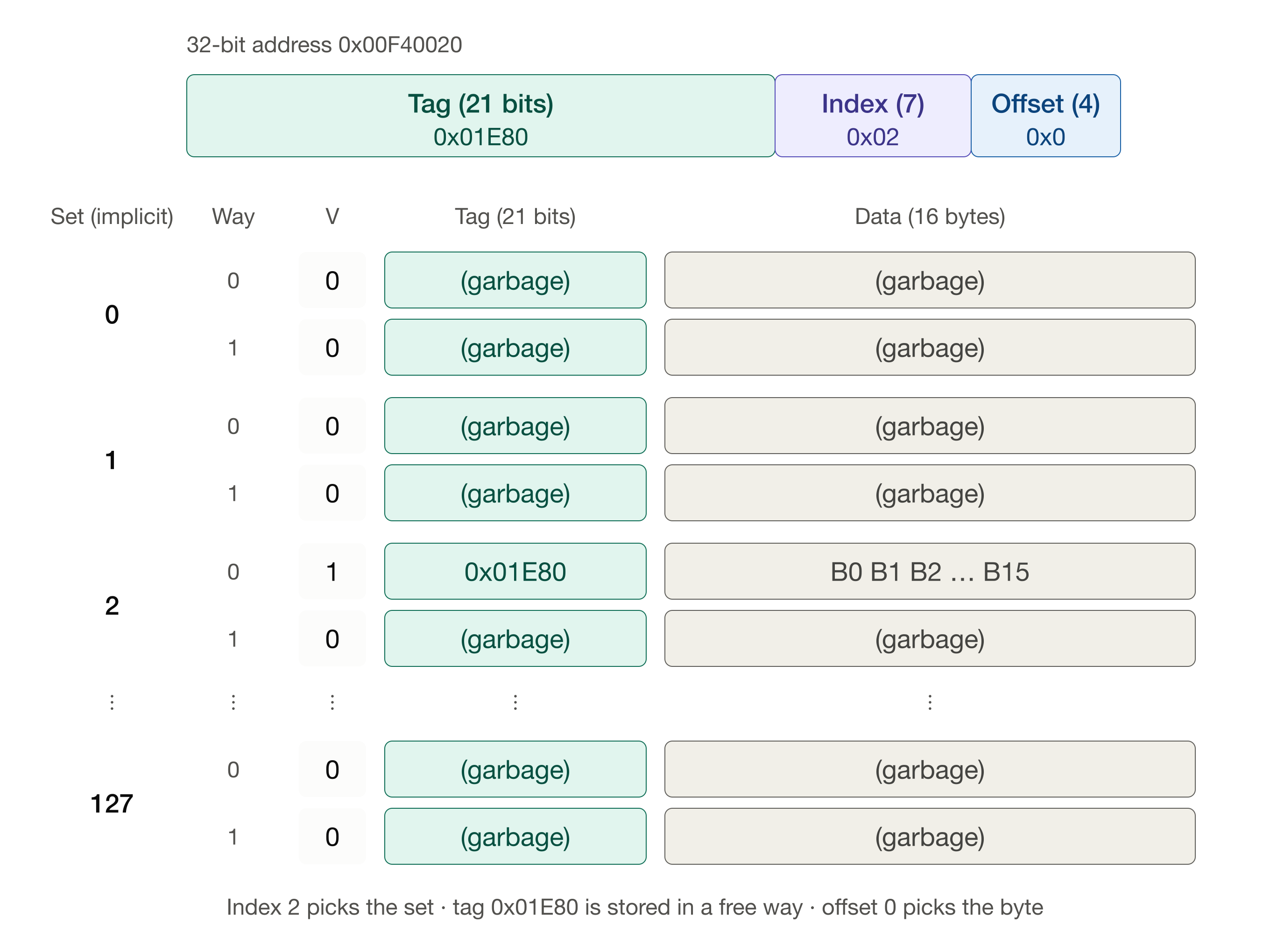
Suppose the CPU requests data at 0x00F40020. Every valid bit is zero, so we have a miss, and the block is fetched from main memory. The index selects set 2. Both ways in set 2 are free, so the block can go in either one; here it goes in way 0.
Now the CPU requests data at 0x0A33C020, the address that caused the conflict before. The index again selects set 2. Way 0 is already occupied by a different block, but way 1 is free, so the new block is loaded into way 1. Nothing is evicted.
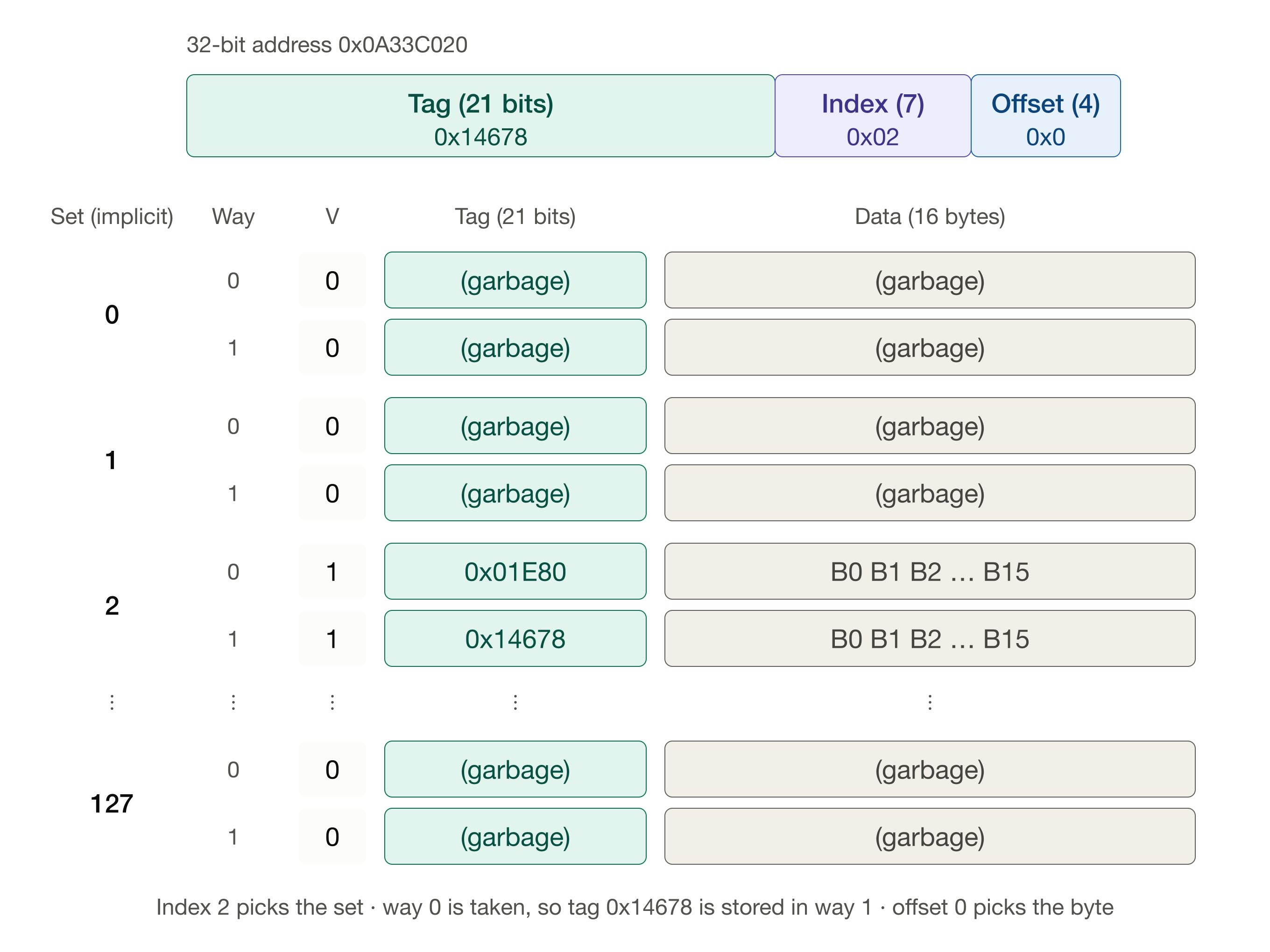
Both blocks now live in the cache, side by side. With a few more requests and cache fills, we might have a cache that looks like this:
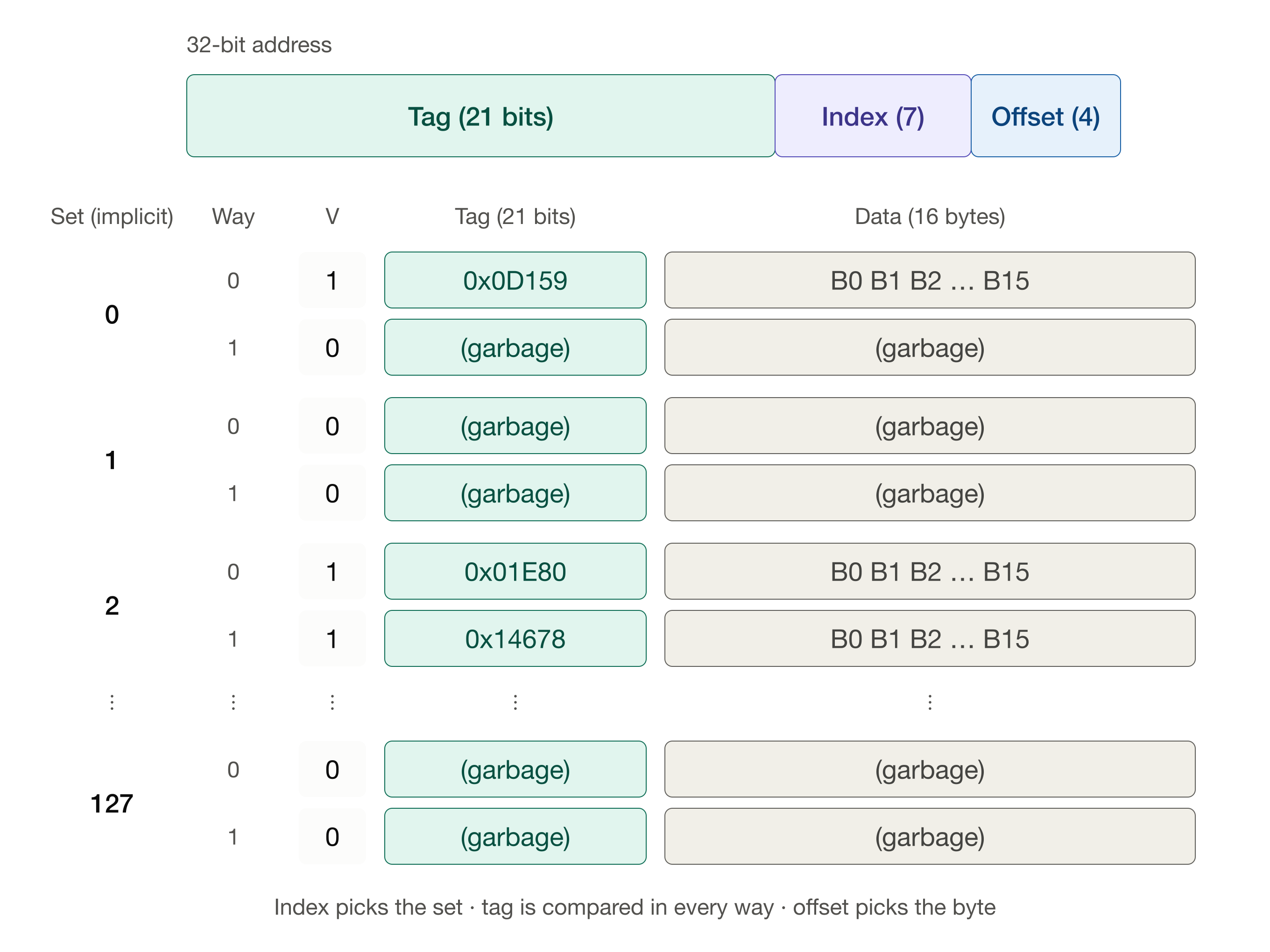
When the processor requests data from a given address:
- The index selects a set.
- For each way in the set, the line’s valid bit is checked and the tag stored in that line is compared to the address’s tag.
- If some way is valid and its tag matches (a cache hit), the offset selects the requested byte from that line’s data block.
- If no way is both valid and matching (a cache miss), the processor fetches the block from main memory and loads it into one of the ways in that set.
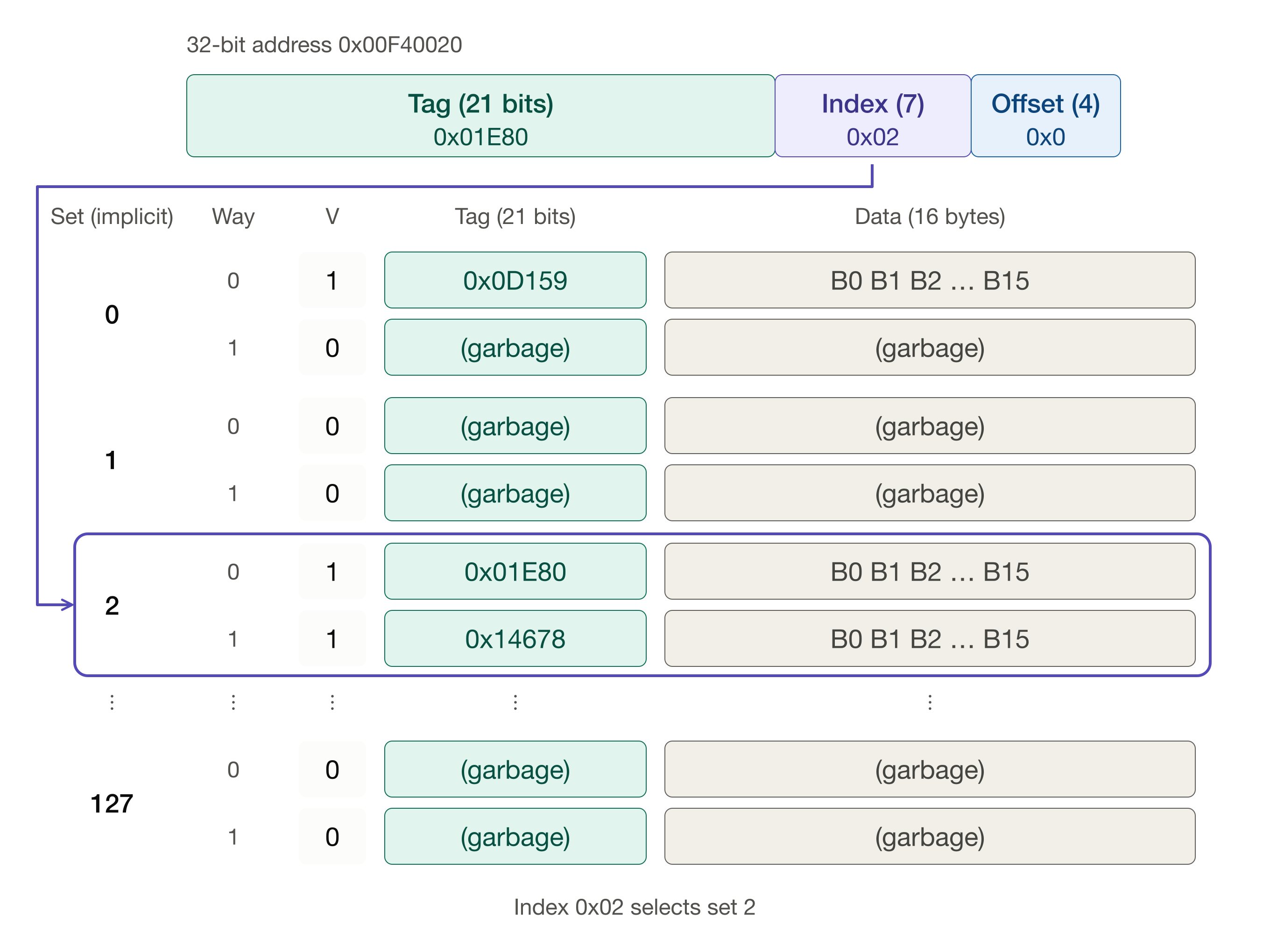
In hardware, the tags of all the ways in the set are compared at the same time. Let’s request 0x00F40020 again. First, the index bits select the set:
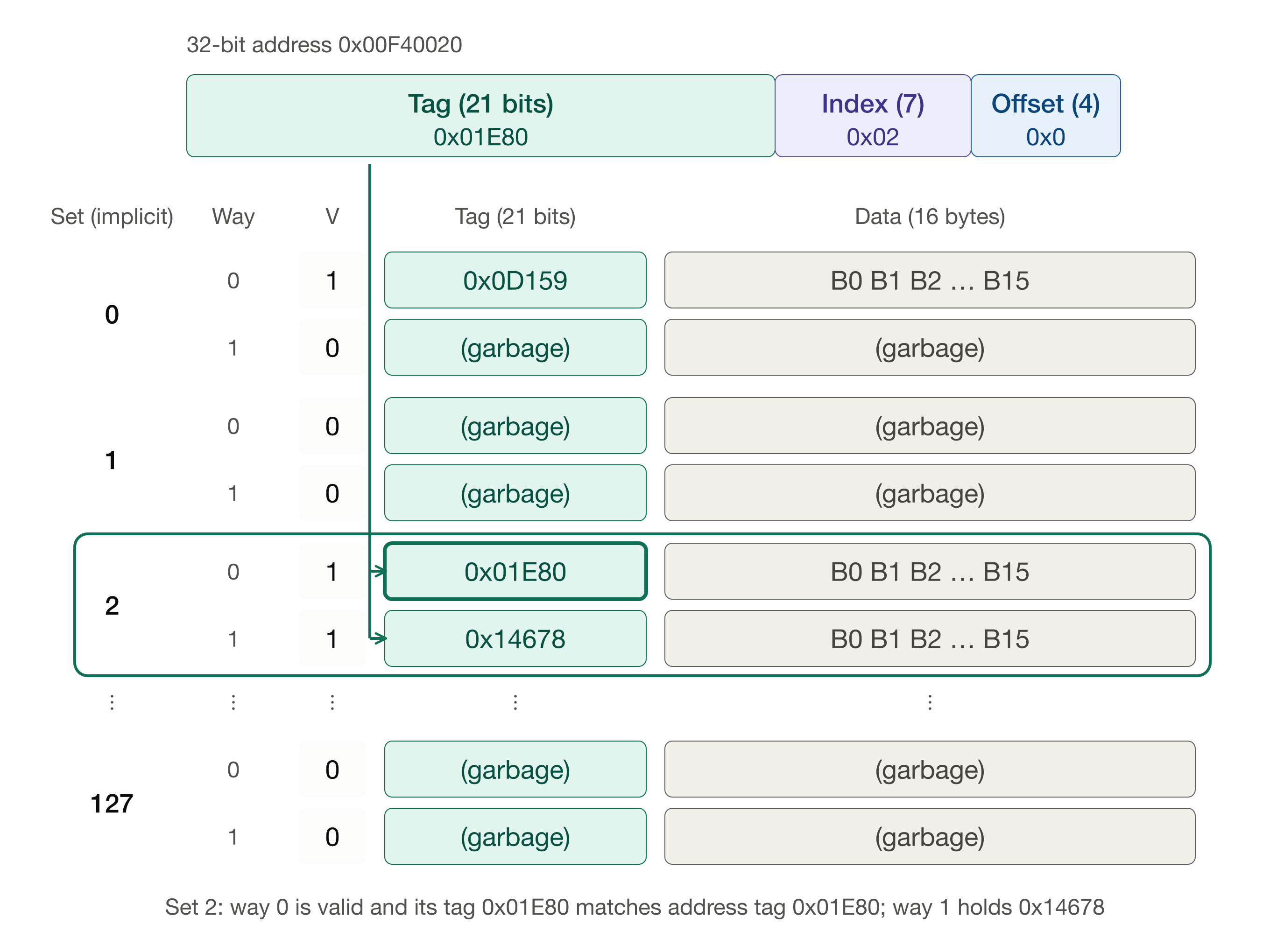
Then the tag in the address is compared with the tag in each way of that set. Way 0 is valid and its tag matches, so we have a cache hit. Way 1 holds a different block (tag 0x14678), which is fine—it simply doesn’t match.
Now return to our loop that alternates between 0x00F40020 and 0x0A33C020. After the first two misses, both blocks are sitting in set 2, and every access after that is a hit. If the loop makes 1,000 accesses, only two of them miss, so the miss rate is 0.002 and:
t_{AMA} = 1.0 + (0.002 \times 4.0) = 1.008 \text{ time units}.
Compare that with 5.0 for the direct-mapped cache. We didn’t make the cache any bigger. We only gave each block more than one place to go.
Cache replacement strategies
What happens when the set is full? Suppose the CPU now requests data at 0x061D3820. Its index is 0x02, so it belongs in set 2, too, but its tag is 0x0C3A7.
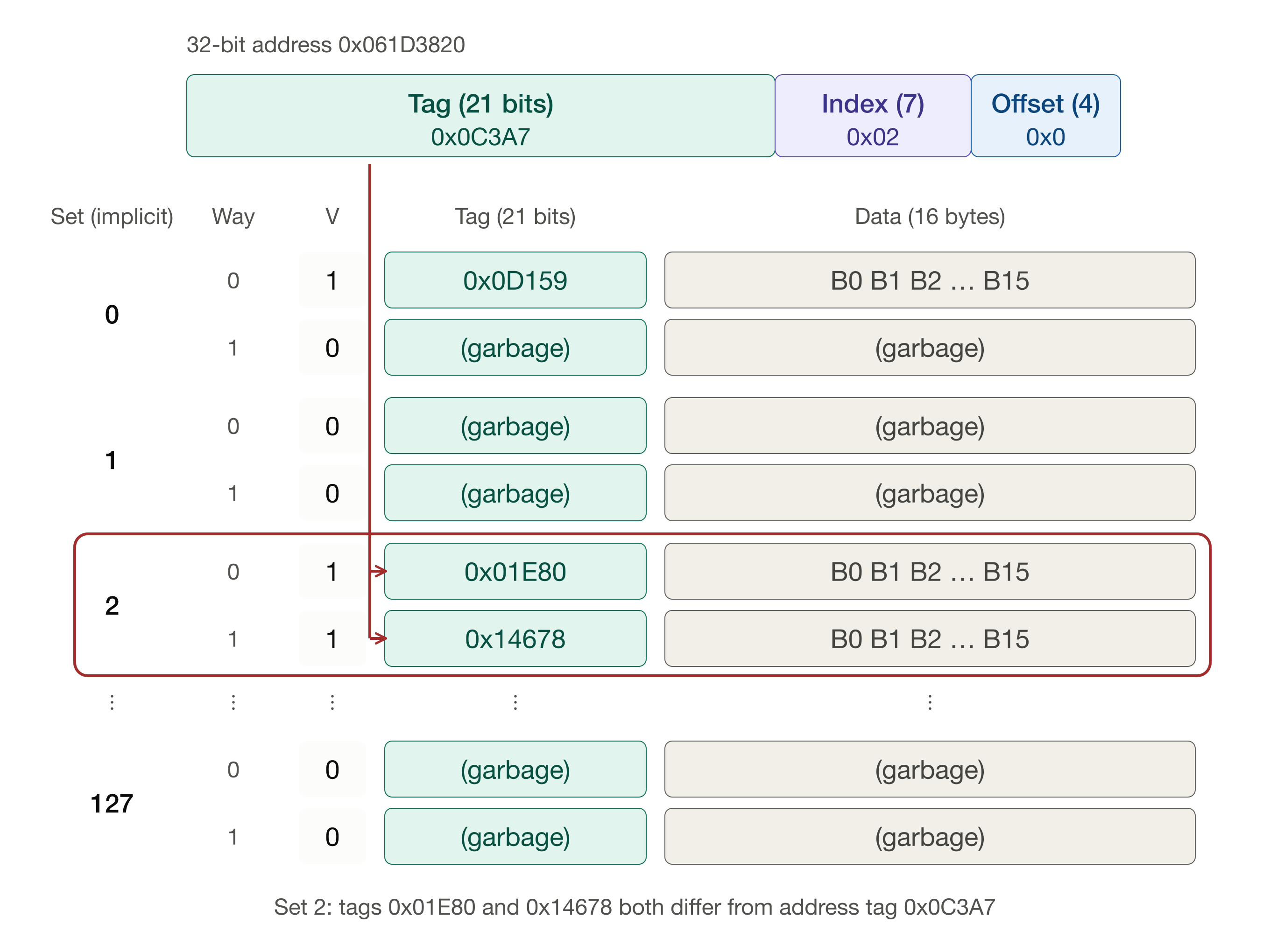
Both ways of set 2 hold valid lines, and neither tag matches, so we have a miss. The block is fetched from main memory, but where does it go? One of the two lines has to be evicted to make room. In a direct-mapped cache this was never a question, because each block had exactly one place to go. With associativity, the cache needs a replacement policy to choose the victim. (If a set contains an invalid line, there’s nothing to evict; the new block simply goes there.)
Random replacement
The simplest policy is to choose the victim at random. It requires no bookkeeping—just a cheap pseudo-random number generator—and in practice it performs surprisingly close to more sophisticated policies. Here, the random choice happens to be way 0, so the block with tag 0x01E80 is evicted and replaced:
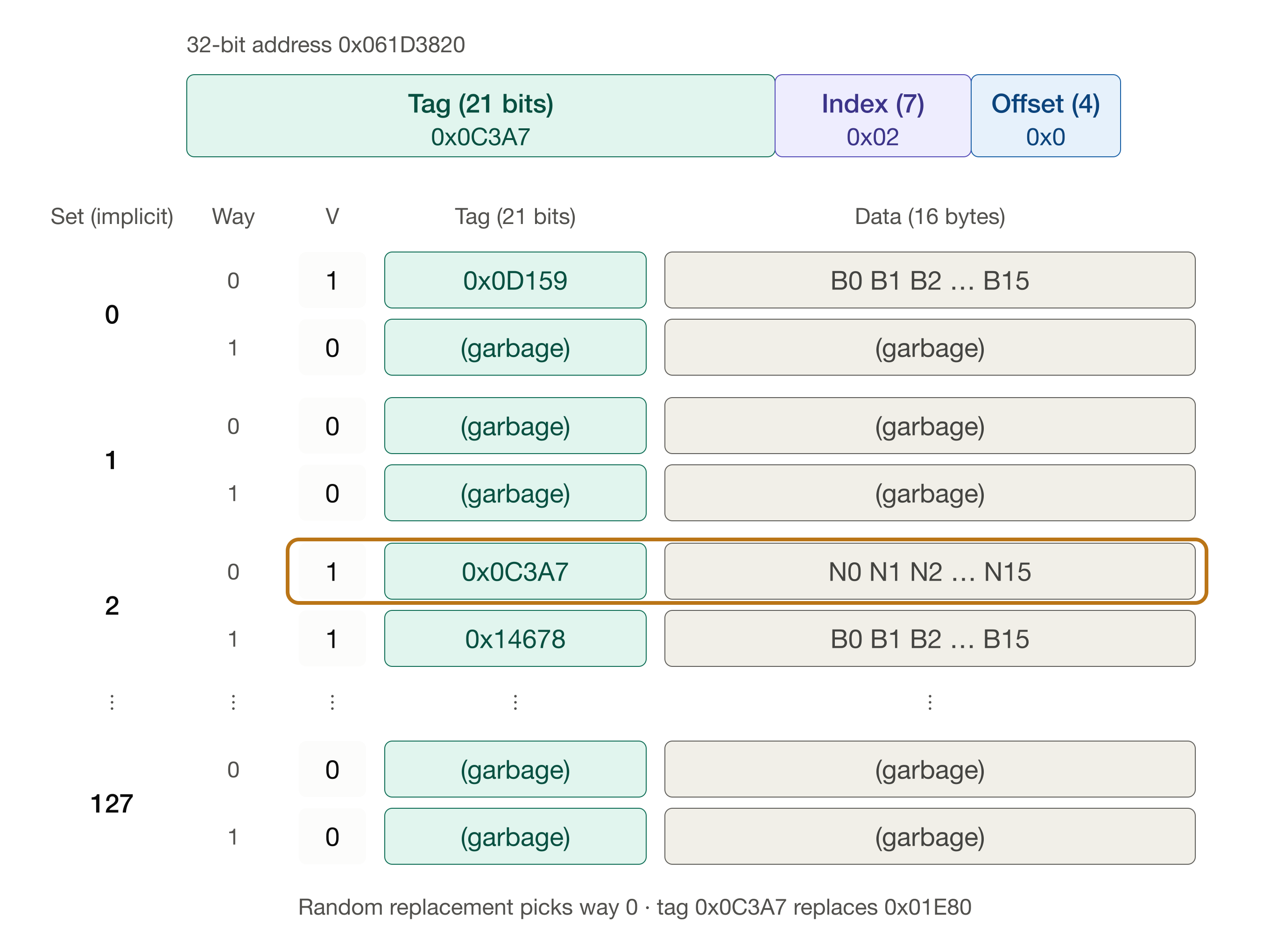
The weakness of random replacement is that it pays no attention to how the blocks have been used. It might evict the very block the CPU is about to request again.
Least recently used (LRU)
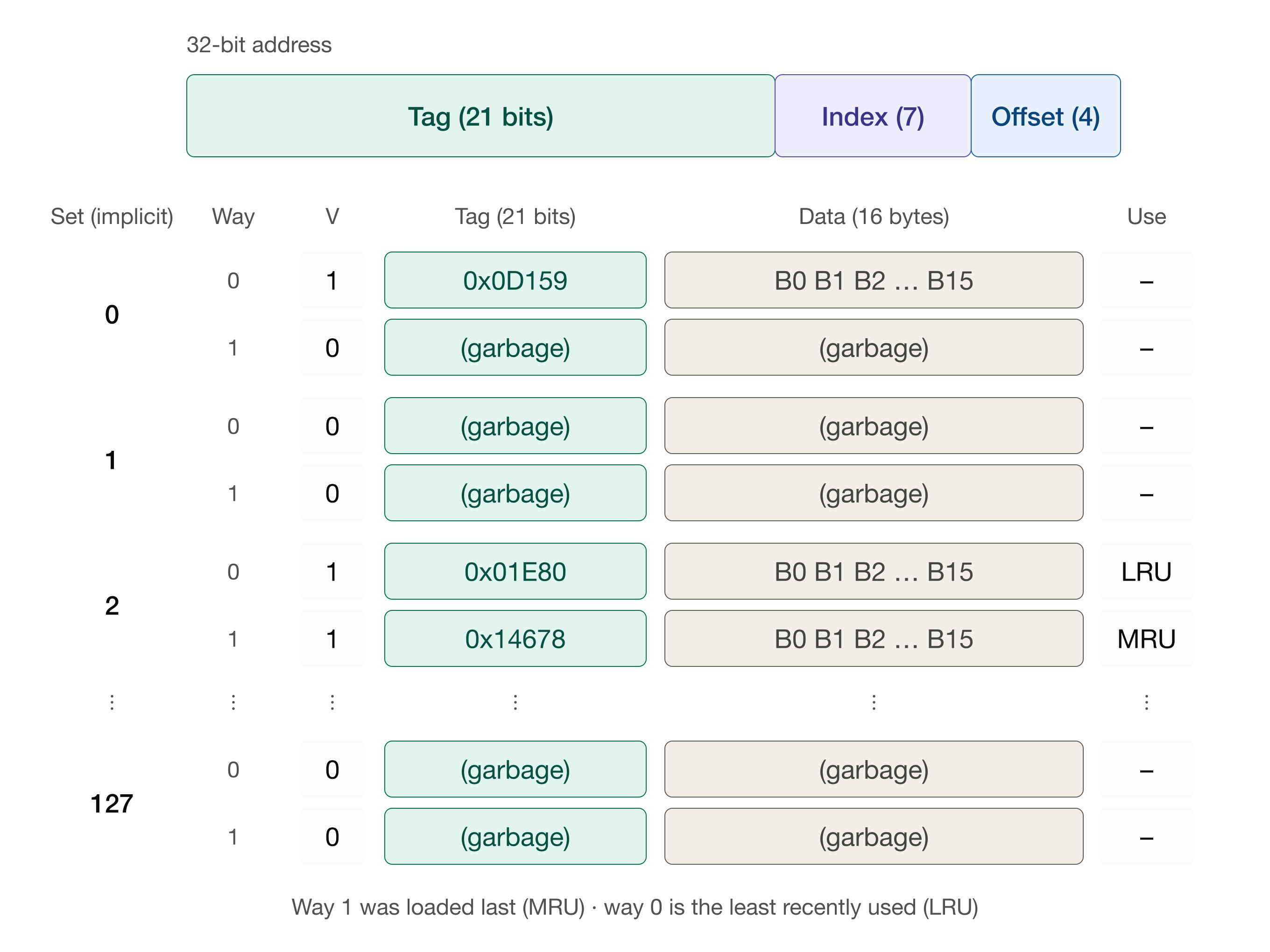
Least recently used (LRU) replacement bets on temporal locality: the block that hasn’t been used for the longest time is the one least likely to be needed soon. This requires some bookkeeping. Each set must keep track of the order in which its lines were used. For a 2-way cache, a single bit per set is enough to say which way is the least recently used. In the following figures, we show this with an extra column, “Use”, which labels the lines in a set as most recently used (MRU) or least recently used (LRU).
Back to our two blocks in set 2. Way 1 was loaded most recently, so way 0 is the LRU line:
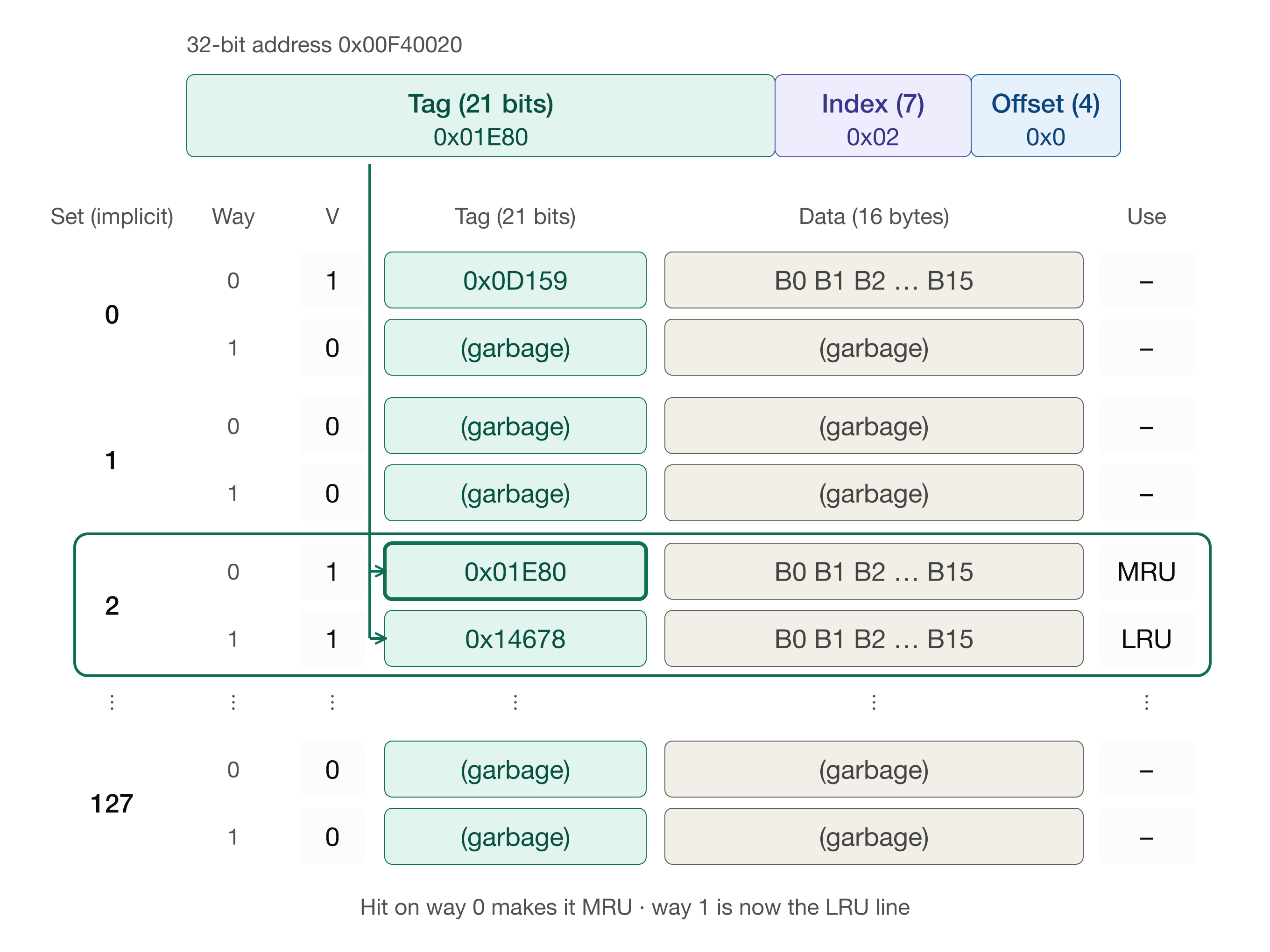
Now the CPU reads 0x00F40020 again. This is a hit in way 0, and way 0 becomes the most recently used line. Way 1 is now the LRU line, even though it was loaded more recently than way 0. Hits change the usage order, too, not just misses.
Then the CPU requests 0x061D3820. Neither tag matches, so we have a miss. The LRU line is way 1, so it is the victim:
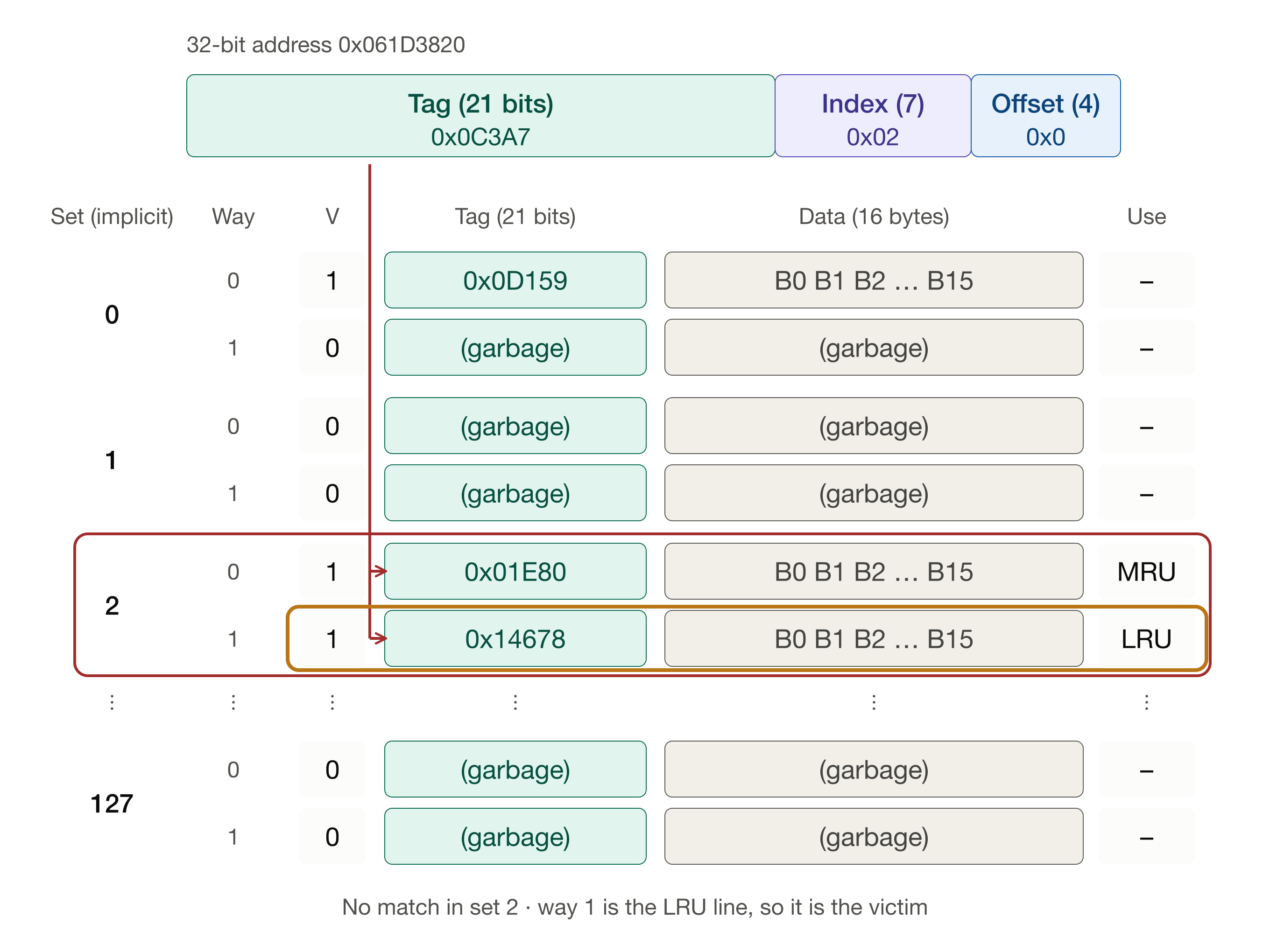
The new block replaces way 1 and becomes the most recently used line. Way 0, which we just used, survives.
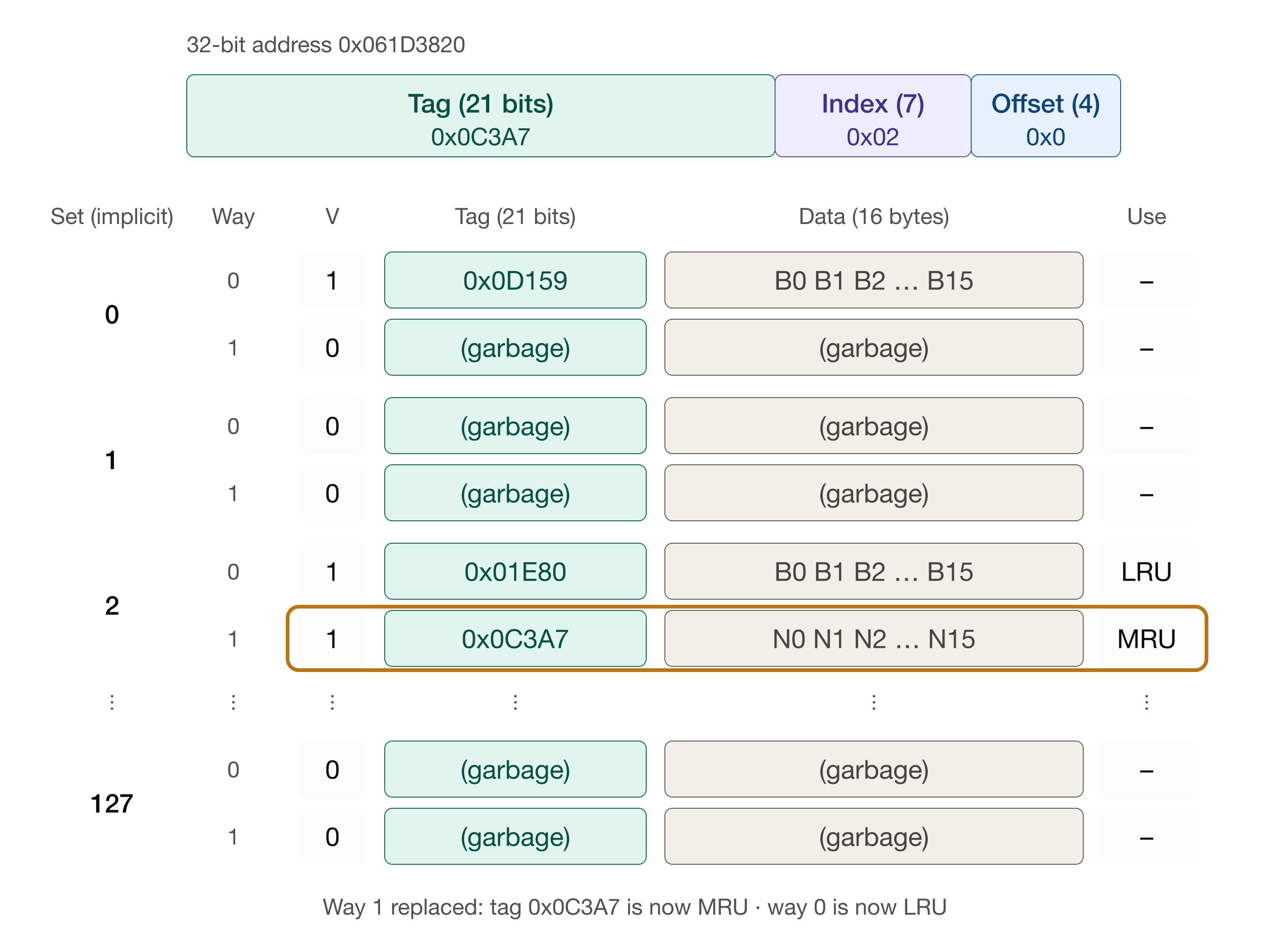
Compare this with random replacement. Random replacement had a fifty-fifty chance of evicting way 0, the block we had just used. LRU would never do that.
True LRU gets expensive as the number of ways grows: the cache has to track a complete ordering of the n lines in every set, and update it on every access. For this reason, real caches with four or more ways often use cheaper approximations of LRU (usually called pseudo-LRU). Another simple policy is first in, first out (FIFO), which evicts the line that has been in the set the longest, regardless of how recently it was used.
When is a cache line updated?
Clearly, the cache is updated on a cache miss. However, the cache is also updated on a write, depending on the cache’s write policy.
There are two main kinds:
Write-through: every time the CPU writes to a cached value, the cache line is updated and the same write is also sent to main memory. A small write buffer queues the outgoing writes so the CPU can continue executing while they complete.
Write-back: the CPU updates only the cache line and marks it dirty; the modified data are written back to main memory later, when that line is evicted.
This means that evicting a dirty line costs an extra write to main memory before the new block can be loaded, whereas evicting a clean line costs nothing extra.
A write can also miss. Under a write-allocate policy, the block is first fetched into the cache and then updated; under a no-write-allocate policy, the write goes straight to main memory and the cache is left unchanged. Write-back caches typically use write-allocate; write-through caches often use no-write-allocate.
So besides cache misses, writes are another time the cache contents change.
Fully associative cache
At the other extreme, a fully associative cache has just one set, and that set contains all of the lines. There are no index bits at all. The address is divided into only a tag (28 bits in our example) and an offset (4 bits), and a block can be placed in any line. Conflict misses disappear: a block is evicted only when the cache is completely full. The price is that every tag in the cache must be compared on every lookup, which is expensive in hardware, so fully associative caches are used only for small structures.
For our 256-line cache, the possibilities line up like this:
| organization | ways | sets | index bits | tag bits | tags compared per lookup |
|---|---|---|---|---|---|
| direct-mapped | 1 | 256 | 8 | 20 | 1 |
| 2-way | 2 | 128 | 7 | 21 | 2 |
| 4-way | 4 | 64 | 6 | 22 | 4 |
| fully associative | 256 | 1 | 0 | 28 | 256 |
Moving down the table, conflict misses become less likely, but lookups require more hardware and take longer. This is the tradeoff that cache designers have to balance.
Summary
To hide or reduce memory latency, modern CPUs employ:
- caches—fast intermediate storage between CPU and main memory,
- pipelining—overlapped instruction execution in stages,
- prefetching—speculatively loading data before use, and
- out-of-order execution—continuing to execute independent instructions while waiting for memory.
© 2025–2027 Clayton Cafiero.
The diagrams in this chapter and the first draft of the section on set-associative caches were produced with the assistance of Claude Sonnet 5.5, a generative AI model from Anthropic, working under the author’s direction. The (human) author provided the example of his writing for direct-mapped caching, examples of hits and misses, an outline for the section on set-associative caches, and a partial draft of write-through and write-back policies. The author reviewed and edited the results. Other material written by the author.
Surya Malik contributed to early drafts of this material.