Bitwise Operations with Python

Python’s bitshift and bitwise operators >>, <<, &, |, ^, and ~
Python, like most other programming languages, has special operators for performing bitshift and bitwise operations on data. A bitshift operation shifts all bits in some operand left or right by some number of places. A bitwise operation is an operation that is applied to individual bits of some object.
Bitshift right and left with >> and <<
>> is the bitshift right operator and << is the bitshift left operator. These are binary infix operators that take the value to be shifted on the left, and the number of positions to be shifted on the right. So, 4 >> 1 gets us 2, because we’ve shifted 0100 one position to the right and we get 0010 (which is decimal 2), and 4 << 1 gets us 8 because we’ve shifted 0100 one position to the left and we get 1000 (which is decimal 8).
What can be confusing is that bitshift operates on the binary representation of the object in question, but Python displays all integer values in decimal by default.
We can get the binary representation of any integer with the bin() built-in, or with an f-string and format specifier.
>>> bin(4)
0b100
>>> f"{4:08b}"
'00000100'
What’s the difference here? The bin() returns a binary representation of an integer argument. We see this because Python binary literals are prefixed by 0b to indicate that they are displayed in binary. The f-string gives us a bitstring, not a number (so we can’t do arithmetic or bitwise operations with the result). In any event, we see that 4 is indeed 100 in binary (leading zeros don’t matter, and prefix aside).
If we shift right, bits fall off the right side as we shift and new zero-bits flow in from the left.
>>> n = 0b10000000
>>> n
128
>>> while n > 0:
...     n >>= 1
...     print(f"{n} \t{n:08b}")
...
64      01000000
32      00100000
16      00010000
8       00001000
4       00000100
2       00000010
1       00000001
0       00000000
Or we can go in the other direction, shifting left.
>>> n = 0b00000001
>>> n
1
>>> while n < 128:
...     n <<= 1
...     print(f"{n} \t{n:08b}")
...
2       00000010
4       00000100
8       00001000
16      00010000
32      00100000
64      01000000
128     10000000
Bitwise operations with &, |, and ^
We’ve seen the Boolean operators and and or. & and | are bitwise logical operators that apply logical and or logical or to individual bits, respectively. ^ is the bitwise exclusive or (XOR).
&, |, and ^ operate bit-by-bit, performing logical and, logical or, or logical XOR on the individual bits two operands.
Here’s bitwise and, &, with two 8-bit operands (we’ll just ignore higher order bits):
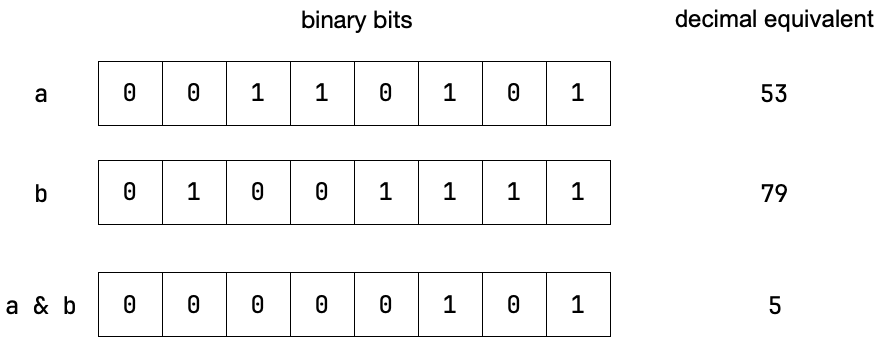
&
Here’s bitwise or, |, with the same operands:
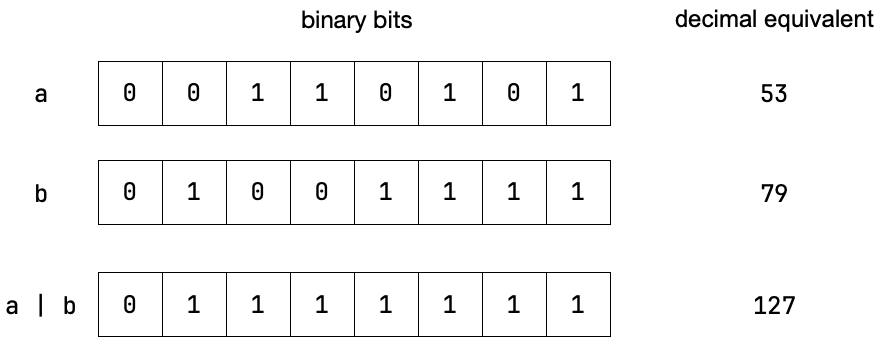
|
Here’s bitwise exclusive or (XOR), ^, with the same operands:
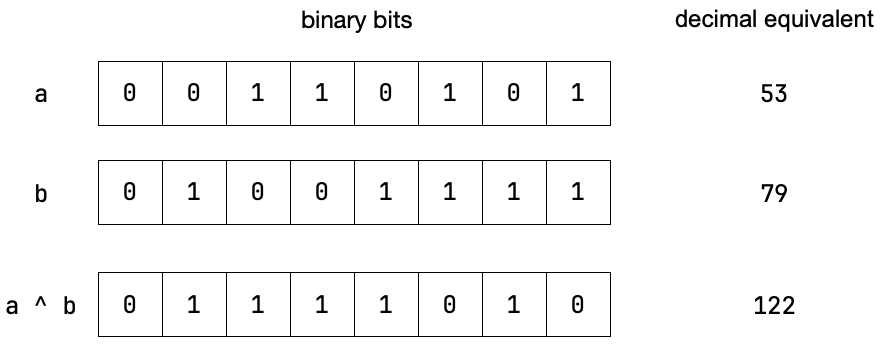
|
Let’s test these in the Python shell:
>>> a = 0b00110101
>>> a
53
>>> b = 0b01001111
>>> b
79
>>> a & b
5
>>> bin(a & b)
'0b101'
>>> a | b
127
>>> bin(a | b)
'0b1111111'
>>> a ^ b
122
>>> bin(a ^ b)
'0b1111010'
So that all checks out!
Isolating a bit or bits with &
Sometimes we want to isolate bits in some value. For this we can use &. Let’s say we wanted to isolate the four low-order bits in a value. We’d create a mask, with 1s in the positions in question, and then apply & with the mask.
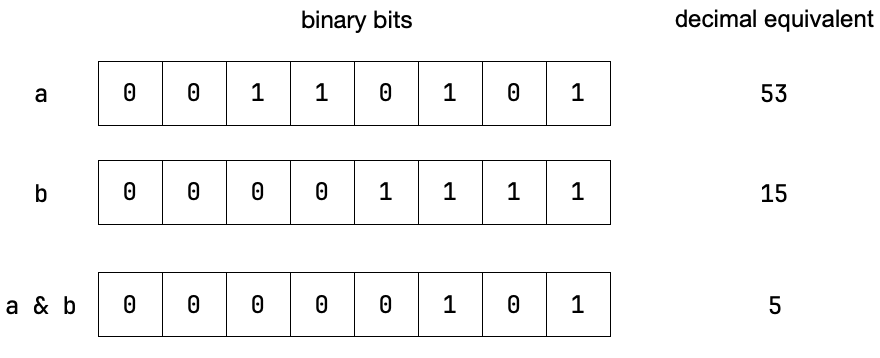
If we wanted to isolate the four high-order bits we use a different mask.
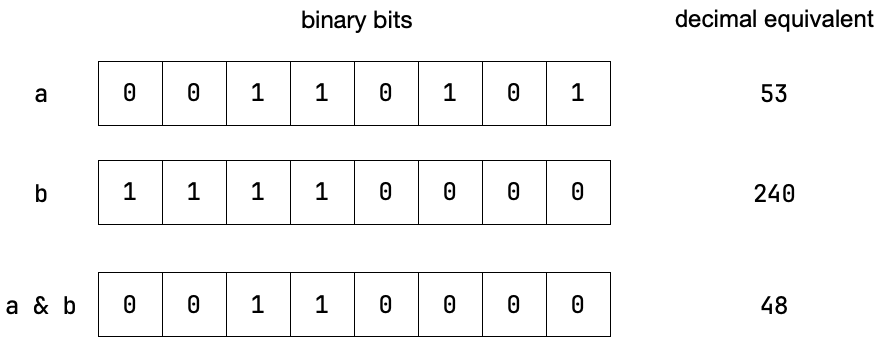
To isolate a single bit, we simply use a mask with a single 1 in the position in question and apply &.
Setting a bit with |
Sometimes we want to set individual bits in some bitstring. We can do this with bitwise or.
flags = 0b0010
mask = 0b0100          # one in the position of the bit we wish to set
result = flags | mask  # sets third bit
print(f"{result:04b}") # prints '0110'
Clearing a bit with & and ~
We can use the same mask to clear an individual bit.
flags = 0b0110
mask = 0b0100
result = flags & ~mask
print(f"{result:04b}") # prints '0010'
Notice that we invert the mask before applying bitwise and.
Toggling bits with ^
We can toggle a bit using a mask and bitwise XOR
flags = 0b0110
mask = 0b0100
result = flags ^ mask
print(f"{result:04b}") # prints '0010' toggling third bit off
result = flags ^ mask
print(f"{result:04b}") # prints '0110' toggling third bit on
result = flags ^ mask
print(f"{result:04b}") # prints '0010' toggling third bit off
result = flags ^ mask
print(f"{result:04b}") # prints '0110' toggling third bit on
© 2025 Clayton Cafiero.
No generative AI was used in writing this material. This was written the old-fashioned way.