Before attending your course registration advising appointment, you are required to complete this homework to ensure you are prepared to make the most of your appointment time. The expectation is that you will have completed a Registration Advising Worksheet (found below in Step 3), which you and your advisor will use during your appointment to finalize your schedule.
All students must complete the steps below, or their course registration appointment may be subject to cancellation. After completing the course registration homework, you will take a quick Pre-Advising Survey (below in Step 3) to confirm your appointment.
The Math Placement Assessment (MPA in Step 3) should be completed at least 24 hours before your appointment!
Step 1: Learn About Your Degree & Advising
Requirements: Components of Your Degree
This video will give you an overview of your requirements as a UVM student in the College of Engineering and Mathematical Sciences.
Advising: What to Expect & How to Prepare
- The appointment will be held on Microsoft Teams with a small group of students and an advisor '
- While you may choose to consult with your family before your appointment, these appointments are for students only
- Your primary goal for the appointment is to finalize your fall schedule
- You will already have been registered for most of your core CEMS classes and will likely only need to add 1-2 classes during this appointment
- Make sure to complete all of the steps below so you are prepared for your meeting
- The expectation is that you will have completed the Registration Advising Worksheet, which you and the advisor will use during your appointment to finalize your fall schedule
- It is okay if you still have questions heading into your appointment. That is expected!
- We look forward to meeting with you!
Step 2: Learn How To Use The Registration System & Look At Classes
How To: Review Your Pre-Registered Schedule
Prior to your course registration appointment, we will have pre-registered you for some of the core classes required for your degree. Your schedule includes any classes required for your major, as well as additional degree-applicable courses appropriate for a first-year student in CEMS. You will have the chance to add and/or change classes during your appointment.
To review your pre-registered schedule, log in to your My UVM account and in the “My Courses” box, click the “My Schedule” link. You will see a weekly overview of your schedule, and if you click each class, you can read the full title of the class.
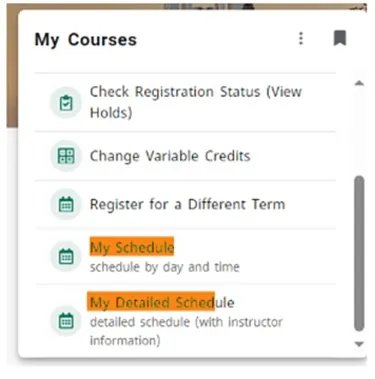
*Note: You may have taken AP/IB/dual enrollment coursework that gives you credit for some of the courses you have been blocked into for the Fall 2026 semester. Our office receives these scores later in the summer, and we will follow up with any student who earns credit to help with schedule adjustments then. There is nothing that should be adjusted on your schedule at this point!
How To: Register
This video will teach you how to use the UVM registration system. You will need to be familiar with this system so that you can make any necessary schedule changes during your appointment. (~7 minutes)
PLEASE NOTE: You will have an Orientation/Advising (“Register at Acad Advising Appt”) hold on your account that your advisor will remove for you the day of your appointment!
Helpful Registration Tips
Here are some additional tips that will be helpful to you during your course registration advising appointment.
- Classes with Labs:
When registering for a class with a lab, you need to register for the lecture section AND the lab section at the same time. Make sure the time of the lecture you are choosing doesn’t conflict with the lab time. - Course Levels & Prerequisites:
As a new first-year student, you should primarily be looking at classes at intro-level/in the 1000s. Some classes require a minimum class standing (i.e. sophomore or junior standing) and/or specific course prerequisites. When you are looking through classes be mindful of the class levels and any listed restrictions in the description.
How To: Find a Catamount Core Class
The Catamount Core Curriculum are UVM’s general education requirements that students in all colleges are required to take. The Catamount Core Curriculum is made up of 42 credits in courses distributed across three main areas: LIBERAL ARTS (21 credits); CORE SKILLS (9 credits); and COMMON GROUND VALUES (12 credits).
Prior to your advising appointment, you will want to pick 3-5 potential Catamount Core options for the fall. Depending on your major in CEMS, you will likely be taking 1-2 of these classes your first semester.
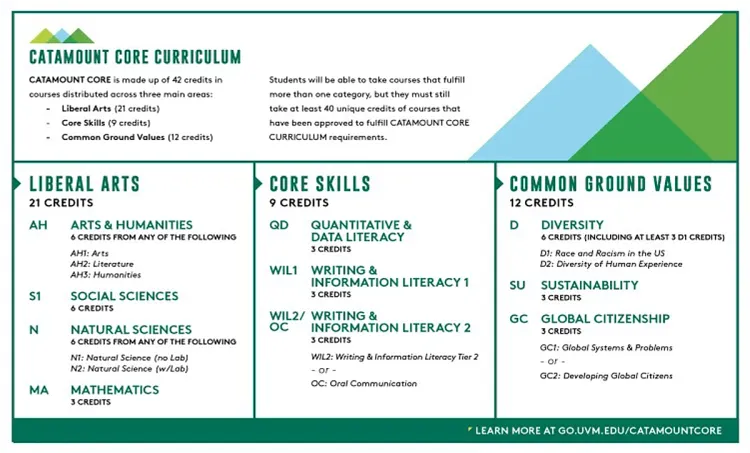
As a CEMS student, some of the courses required for your major will cover the Catamount Core (for example, Calculus I covers the Mathematics (MA) requirement. When looking for potential Catamount Core options for the Fall semester, you should look for courses that cover either Arts & Humanities (AH1, AH2, or AH3), Social Science (S1), or Diversity 1 (D1) or Diversity 2 (D2).
Step 3: Complete Pre-Advising Appointment Homework
To Do: Set-Up Microsoft Teams & Log-in/Test Your Account
You are required to be on a computer with access to your myUVM account for your appointment. Your advisor will connect with you using Microsoft Teams.
It is important that you have set-up and tested your Microsoft Teams account before your appointment to make sure it works. You must sign into Teams with your UVM e-mail address! Please be sure to check this/set this up ahead of time. If you have already created a Teams account with a non-UVM email address, you need to log-out and sign up with your UVM credentials.
Click here for Microsoft Teams instructionsPlease do a test run of Teams to make sure your camera and audio work.
IMPORTANT NOTE: It’s helpful for you to be able to share your screen with the advisor you are meeting with so they can help you navigate the registration system. If you’re using a Mac, you’ll need to grant permission to Teams to record your computer’s screen before you can share.
Here are instructions on how to share your screen on a Mac:
- You’ll be prompted to grant permission the first time you try to share your screen. Select Open System Preferences from the prompt. If you miss the prompt, you can do this anytime by going to Apple Menu > System Settings > Privacy & Security.
- Under Screen & System Audio Recording, make sure the toggle next to Microsoft Teams is turned on.
- Go back to your meeting and try sharing your screen again.
To Do: Take Math Placement Assessment (MPA)
All first-year CEMS students are required to take the MPA to determine readiness for calculus courses. The Math Placement Assessment is up to 30 questions and generally takes 60 - 90 minutes to complete. After the Placement Assessment, an individualized Prep and Learning Module is available so that you can refresh your knowledge on forgotten topics. You will then have the opportunity to reassess and improve your placement.
A score of 76 or higher is needed on the MPA to take MATH 1234 (Calculus I) in the fall. If you score under a 76 you can chat with an advisor during your appointment about registering for Pre-Calc or re-taking the MPA.
Please complete the placement test at least 24 hours before your appointment!
Math Placement Assessment (~60-90 minutes to complete)
To Do: Registration Advising Worksheet- Complete Before Your Appointment!
All students are required to complete a registration advising worksheet before their appointment and should have this form available to share with their advisor during the appointment. This worksheet will help you and your advisor make the most of your appointment time.
Download the Pre-Advising Worksheet (Fillable PDF)
REMINDER: you must have your student ID (CATcard) completed before arriving to campus. For more information visit: https://www.uvm.edu/catcard/students
We are so excited to work with you!
We understand that this is a lot of information, and even after completing all the steps above, you will have questions! This is expected and there will be plenty of time to get answers before and through the start of the semester. The above steps are meant to give you context for your very first advising appointment. After completing everything, you should be equipped with a general familiarity of your degree requirements, a list of potential Catamount Core classes and questions (advising worksheet), and excitement for the journey ahead! We look forward to talking with you soon.
Helpful Links & UVM Resources
- Math Placement Assessment
- Foreign Language Placement (if you are interested in taking Spanish or French in the fall)
- AP Comparability Guide
- Laptop Requirements
- Majors in CEMS
- Minors at UVM
- Academic Calendars
- CEMS Student Services
- Division of Intercultural Excellence
- Academic Support Resources
- Center For Health and Wellbeing